Mac mini M6 AI Image: 3 min 20 s to 2 min 20 s, Qwen-Image 2.1 Measured
Posted Video released
On a Mac mini M6 32GB, Qwen-Image 2.1 took 3 min 20 s in default ComfyUI, about 2 min 20 s with just the model file switched to bf16, and about 2 min with mflux 4-bit. Korean text accuracy and memory picks included.
On a Mac mini M6 32GB, we generated the same image (1024×1024, 25 steps) with Qwen-Image 2.1. ComfyUI's default settings took 3 minutes 20 seconds per image, and swapping just one diffusion model file to bf16 cut it to about 2 minutes 20 seconds. The terminal tool mflux at 4-bit was fastest at about 2 minutes. This post rewrites the content of our YouTube video, separating our measurements from calculations.
Conclusions first
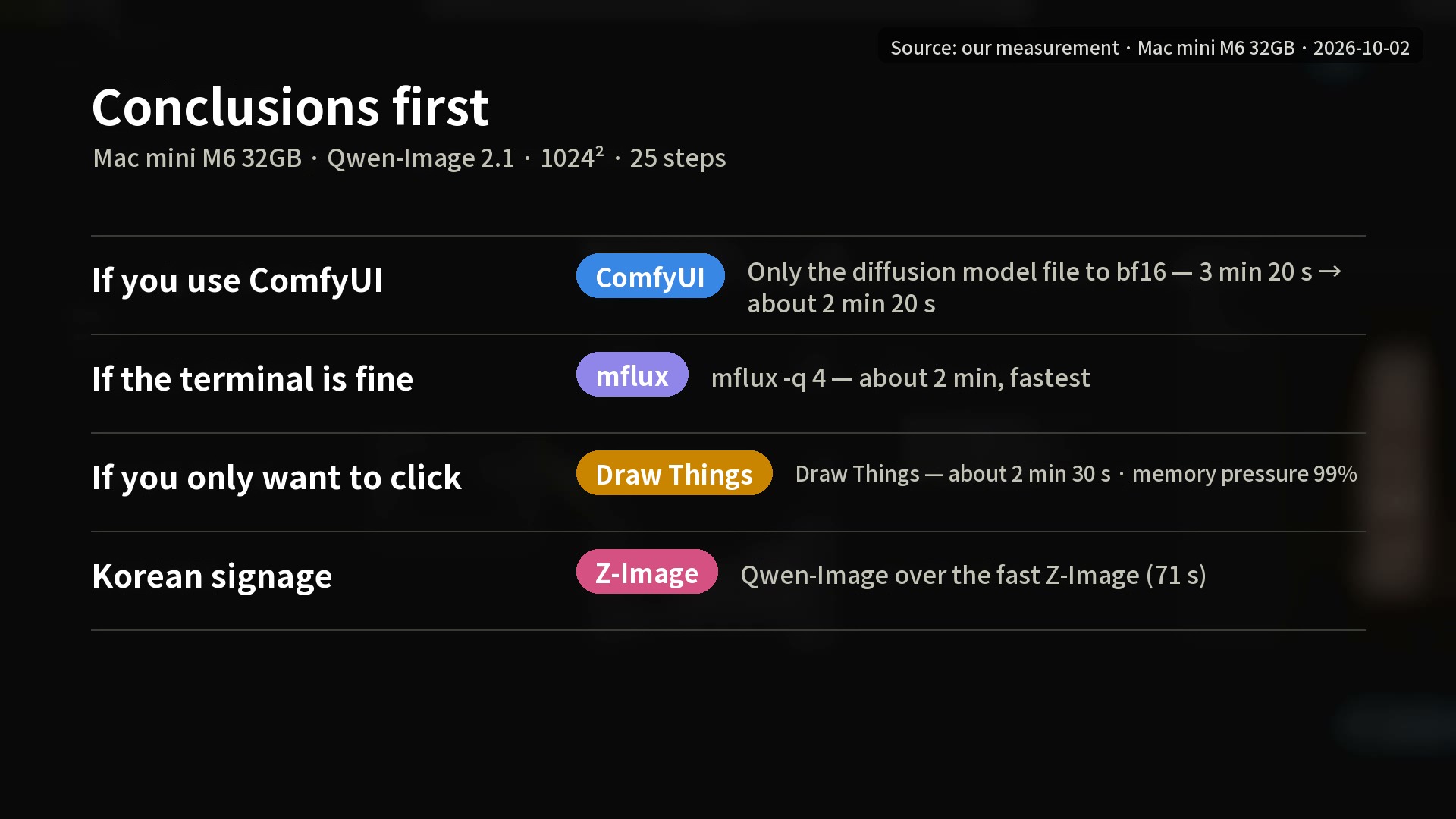
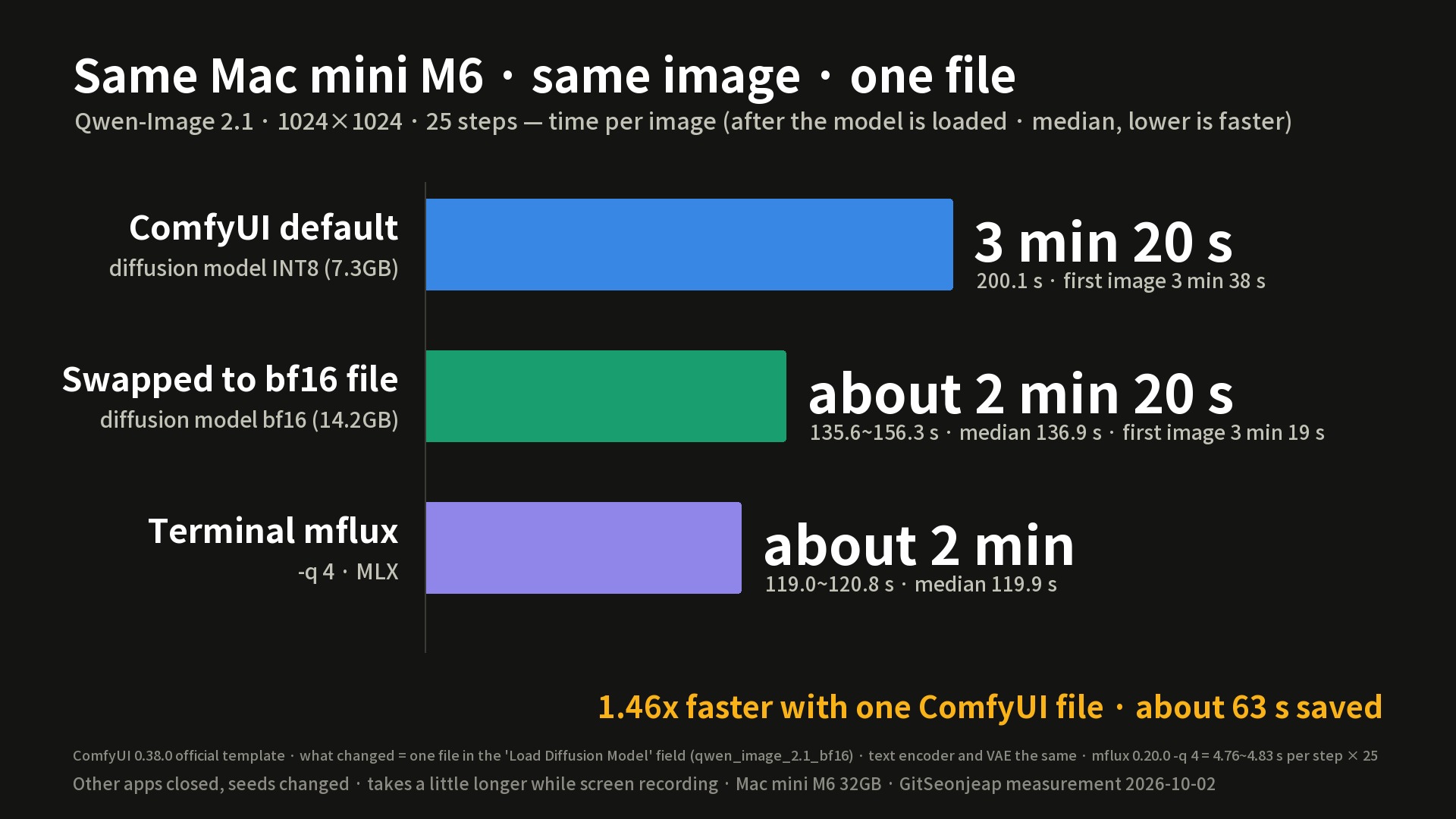
- If you use ComfyUI, changing only the file in the Load Diffusion Model field to bf16 is the easiest improvement. It went from 3 minutes 20 seconds to about 2 minutes 20 seconds (1.46x, about 63 seconds saved).
- If you are comfortable with the terminal, mflux -q 4 was fastest at about 2 minutes.
- Draw Things is the easiest, but on 32GB memory pressure reached 99% and its Korean text was less accurate.
- The fp32 tip circulating online (--force-fp32) did not finish a single image in over 15 minutes, and the tip of sending the VAE to the CPU (--cpu-vae) was not faster.
- If you need Korean signage, choose Qwen-Image over the fastest option, Z-Image-Turbo (1 minute 11 seconds). Z-Image wrote the sign text "깃선제압 분식" as "깃선제암 본적".
What kind of numbers these are
Times, memory, and character accuracy are all our measurements (Mac mini M6 32GB, 2026-10-02). The recommendations by memory size are a calculation based on the 32GB measurements; we did not measure 16, 24, 48, or 64GB. The 6-19 seconds for one RTX 5090 is a cited public figure that we did not measure, and it varies by settings.
Test conditions
One Mac mini M6 32GB, 1024×1024, 25 steps (8 for Z-Image), CFG 1, euler/simple. The prompt was a night-alley snack shop with the vertical sign reading "깃선제압 분식" and the horizontal sign "24시 국밥". We closed other apps, changed seeds to produce several images, and logged memory, swap, and memory pressure every second. Times are for one image after the model is loaded; the first image, which includes model loading, is listed separately. We used ComfyUI 0.38.0, PyTorch 2.14.1 (MPS), mflux 0.20.0, MLX 0.32.3, and the App Store version of Draw Things.
There are two models. Qwen-Image 2.1, released on September 20, was downloaded 5.38 million times in 30 days for the ComfyUI official set alone, according to the video. However, it is under a non-commercial research and evaluation license (Qwen Research License), so the images in the video were made for evaluation purposes only. The fast alternative, Z-Image-Turbo, needs only 8 steps and is under Apache 2.0, which allows commercial use. There are three ways to run them on a Mac: ComfyUI, the Mac app Draw Things, and the terminal tool mflux, which runs on MLX, and the computation is done by the Mac's GPU in all three.
ComfyUI default: 3 minutes 20 seconds per image
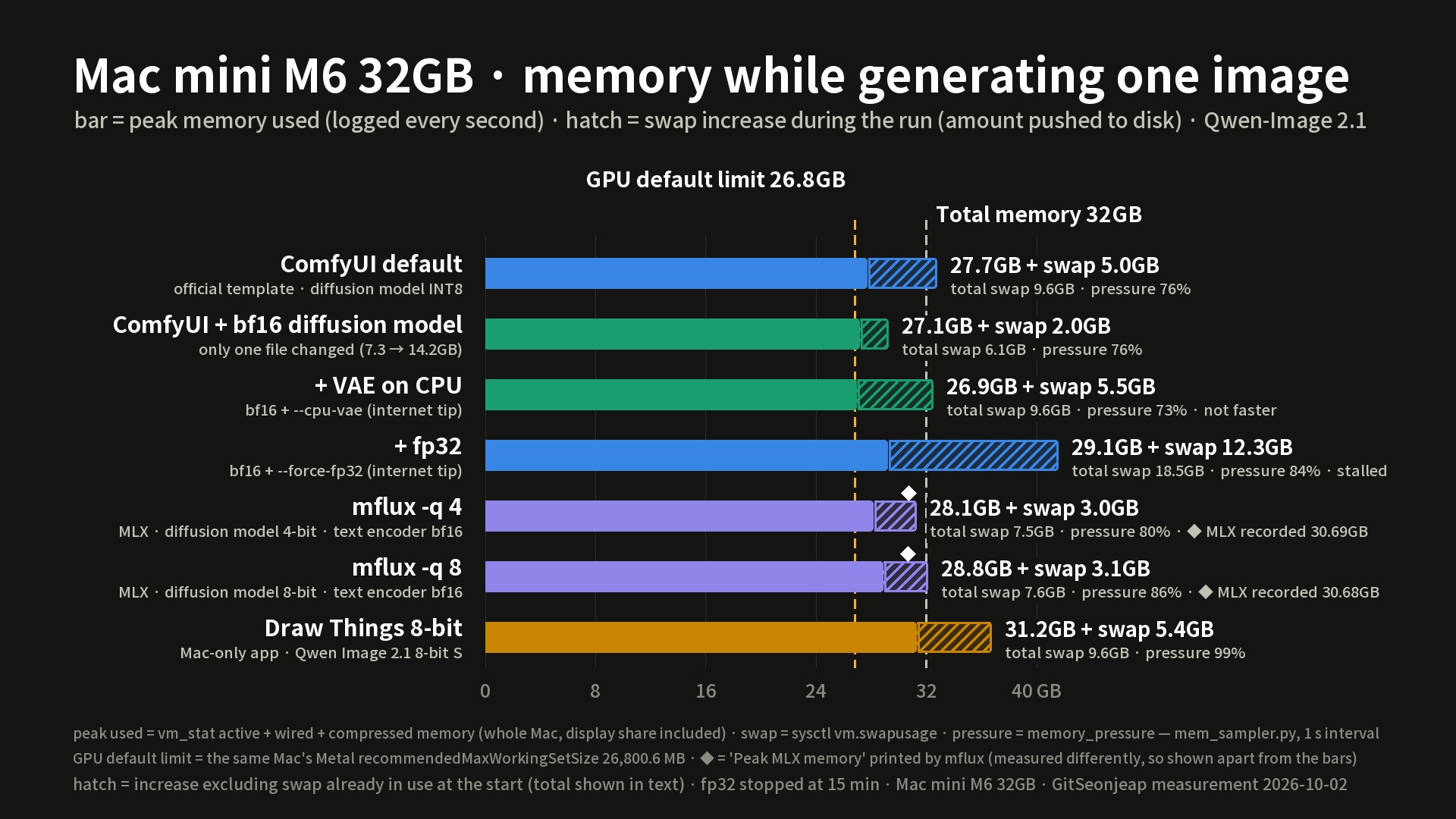
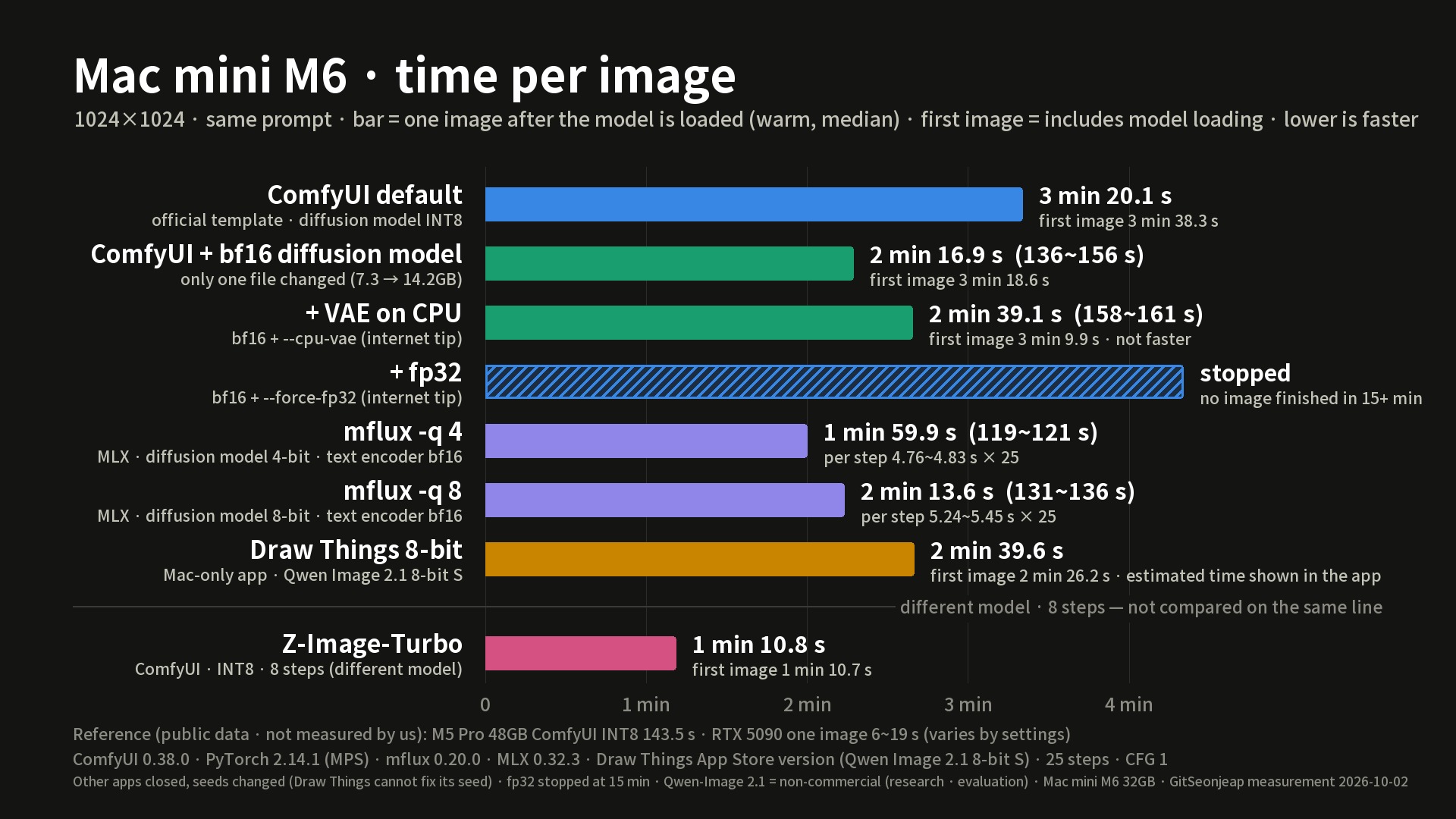
When you pick Qwen-Image 2.1 from the template, the default set is the file compressed to INT8. It took 3 minutes 20 seconds per image (200.1 seconds), and the first image took 3 minutes 38 seconds because it loads the model. Memory peaked at 27.7GB, swap grew by 5.0GB, and memory pressure rose to 76%. On a 32GB Mac this model runs, but only just.
The change is one field: bf16
We changed the diffusion model file from INT8 (7.26GB) to bf16 (14.23GB). The file doubled in size, yet one image got faster, ranging from 2 minutes 16 seconds to 2 minutes 36 seconds, with a median of 136.9 seconds (about 2 minutes 20 seconds). Peak memory was similar at 27.1GB and swap grew by only 2.0GB. The video explains that INT8 shrinks the file but has to decompress to the original numbers at every computation, and on a Mac GPU that decompression time seems to become real cost. This cause was not isolated by measurement and is an estimate.
The changed setting is only this: in the official ComfyUI Qwen-Image 2.1 template, Load Diffusion Model was switched from qwen_image_2.1_int8_convrot.safetensors to qwen_image_2.1_bf16.safetensors; the text encoder and VAE stay the same.
mflux and Draw Things
mflux (MLX) takes the original model and shrinks only the diffusion model to 4-bit at run time with the -q 4 option, giving about 2 minutes per image (119.9 seconds, 4.76 to 4.83 seconds per step). The 8-bit -q 8 was actually slower at about 2 minutes 13 seconds, and because the text encoder stays original, the peak memory MLX recorded was about 30.7GB for both. Draw Things downloads the 8-bit version of Qwen-Image 2.1 inside the app and finishes with clicks alone, about 2 minutes 30 seconds per image (146 to 160 seconds), but memory pressure rose to 99%, making it the tightest on 32GB.
Time per image, all methods
| Method | Time per image | System peak memory + swap increase |
|---|---|---|
| ComfyUI default (INT8) | 3 min 20 s | 27.7GB + 5.0GB |
| ComfyUI + bf16 diffusion model | about 2 min 20 s | 27.1GB + 2.0GB |
| ComfyUI + bf16 + VAE on CPU | about 2 min 39 s | 26.9GB + 5.5GB |
| ComfyUI + bf16 + fp32 | did not finish one image in over 15 min, stopped | 29.1GB + 12.3GB |
| mflux -q 4 | about 2 min | 28.1GB + 3.0GB |
| mflux -q 8 | about 2 min 13 s | 28.8GB + 3.1GB |
| Draw Things 8-bit | about 2 min 30 s | 31.2GB + 5.4GB |
| Z-Image-Turbo (different model, 8 steps) | about 1 min 11 s | - |
Z-Image's 1 minute 11 seconds uses a different model and step count, so we do not compare it on the same line.
Checking the internet tips
The fp32 tip unpacked the diffusion model alone to over 28GB, so no image finished after 15 minutes and swap grew by 12GB. On a 32GB Mac it is a setting that actually makes things stall. The tip to run the VAE on the CPU took 2 minutes 38 seconds and 2 minutes 41 seconds for two images (157.5 and 160.6 seconds), so it was not faster, and memory was about the same. The often-recommended ComfyUI-MLX node publishes performance figures based on Flux 1 and its original repository is currently down, so we did not measure it; we also could not measure the MPS acceleration node this time.
Korean signage accuracy
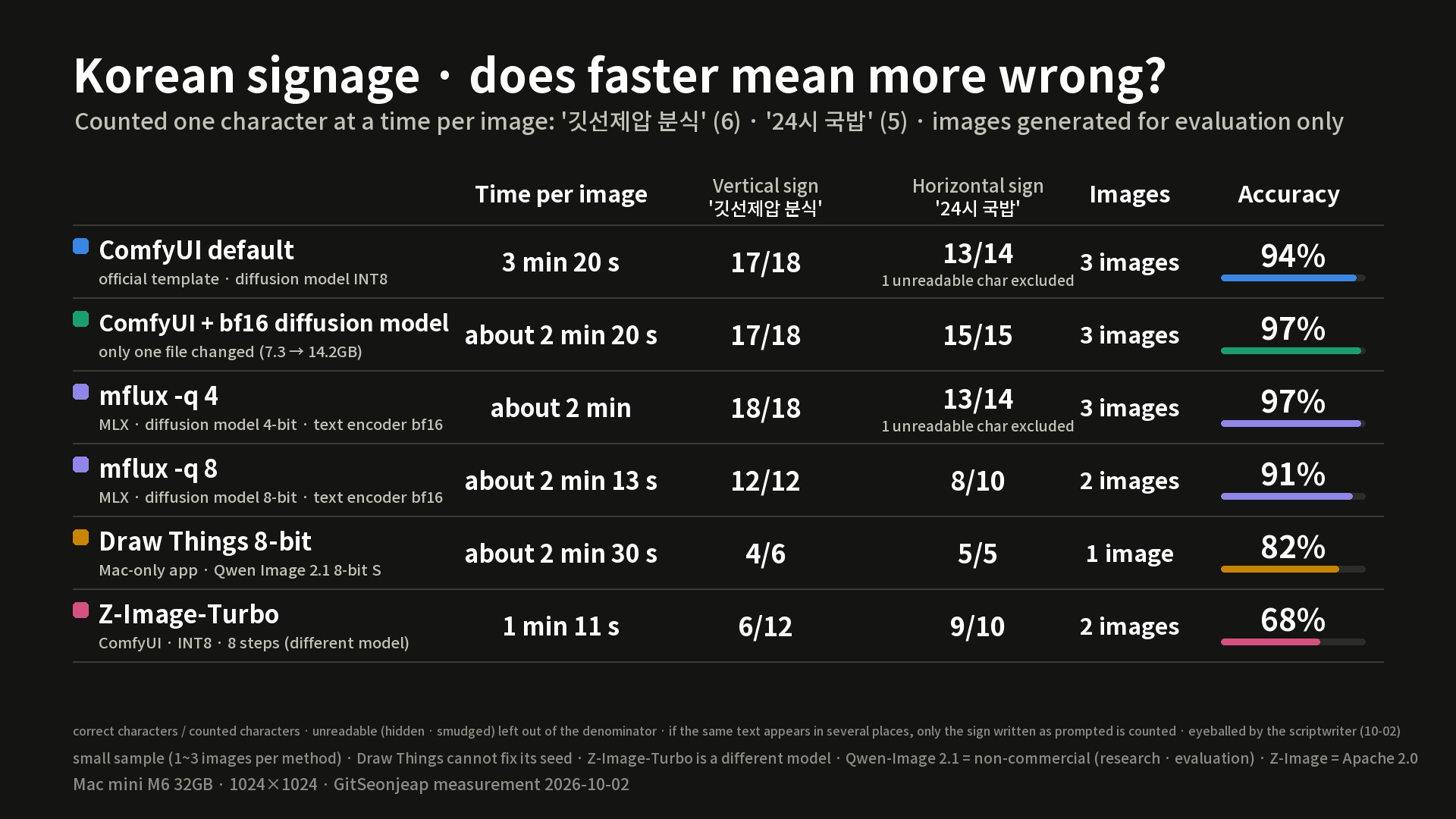
We counted the 6 characters of "깃선제압 분식" and the 5 characters of "24시 국밥" one character at a time for each image. Qwen-Image got the signs almost right whether INT8 or bf16, and even when wrong it was only writing 깃 as 킷. Draw Things wrote the first two characters of the vertical sign as "갓셔", and Z-Image wrote "깃선제압 분식" as "깃선제암 본적". It was not that faster meant more wrong; the model and app divided the character accuracy, and it is a small sample of 1 to 3 images per method.
Recommendations by Mac memory (calculation)
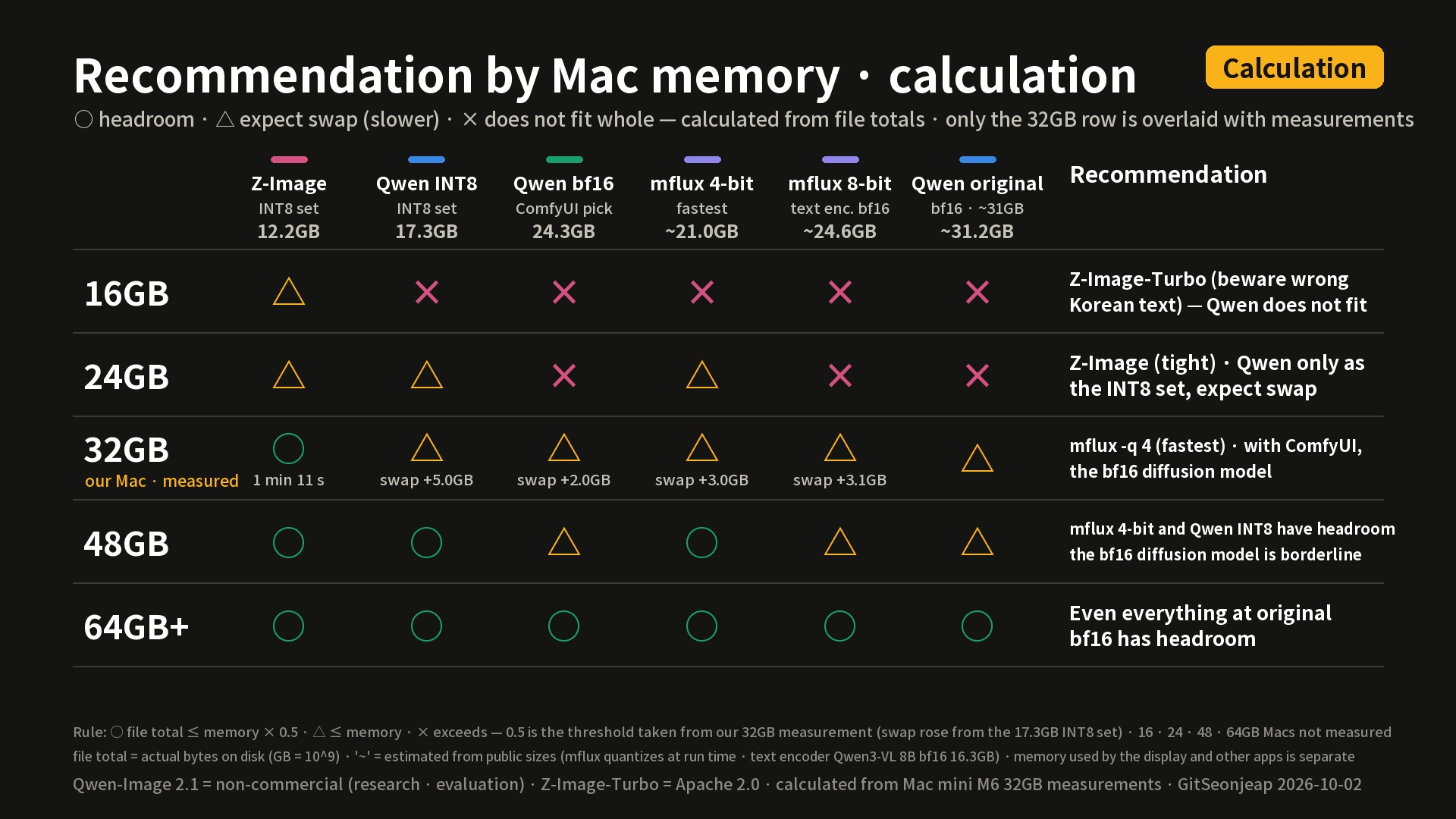
This is a calculation based on the 32GB measurements; other memory sizes were not measured. The rule: if the file total is at most memory x 0.5 it has headroom (circle), if at most memory you should expect swapping (triangle), and if it exceeds memory it does not fit at all (cross); the 0.5 is the threshold taken from the 32GB measurements.
| Memory | The video's summary |
|---|---|
| 16GB | Z-Image-Turbo (beware wrong Korean text). The official Qwen-Image set at 17.3GB does not fit |
| 24GB | Z-Image is tight; Qwen-Image only as the INT8 set, expecting swap |
| 32GB | mflux -q 4 (fastest); with ComfyUI, the bf16 diffusion model |
| 48GB | mflux 4-bit and the INT8 set have headroom; the bf16 diffusion model is borderline |
| 64GB or more | Even everything at original bf16 has headroom |
Verdict and limits
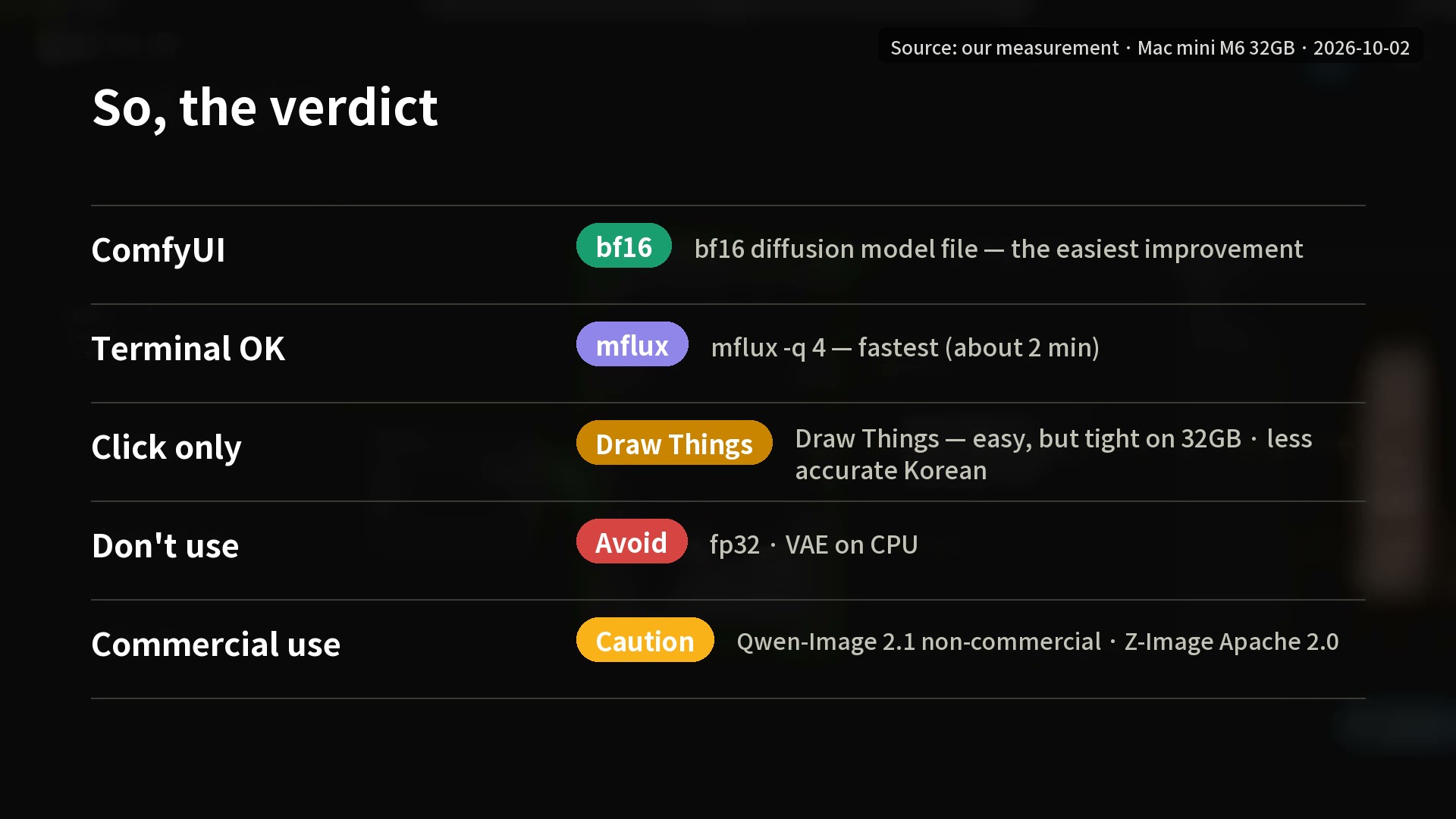
The video's summary: with ComfyUI, one bf16 file; if the terminal is fine, mflux 4-bit; if you only want to click, Draw Things (tight on 32GB and less accurate in Korean); and skip the fp32 and VAE-on-CPU tips. For commercial work, check the license first: Qwen-Image 2.1 is non-commercial and Z-Image allows commercial use.
- Korean accuracy is a small sample of 1 to 3 images per method, and Draw Things cannot fix its seed.
- Times were measured with changing seeds, and take a little longer while screen recording. The memory recommendations are a calculation.
- Reference date: measured 2026-10-02, video published 2026-10-03 (as of the video's publication; tool versions may have changed since).