Mac mini M6 32GB Server vs M5 Pro 24GB: 5 Use Cases (M6 Measured)
Posted Video released
Mac mini M6 32GB vs M5 Pro 24GB as a server in 5 cases: website, home server, small AI, multi-user AI, big models. M6 measured, M5 Pro from public data.
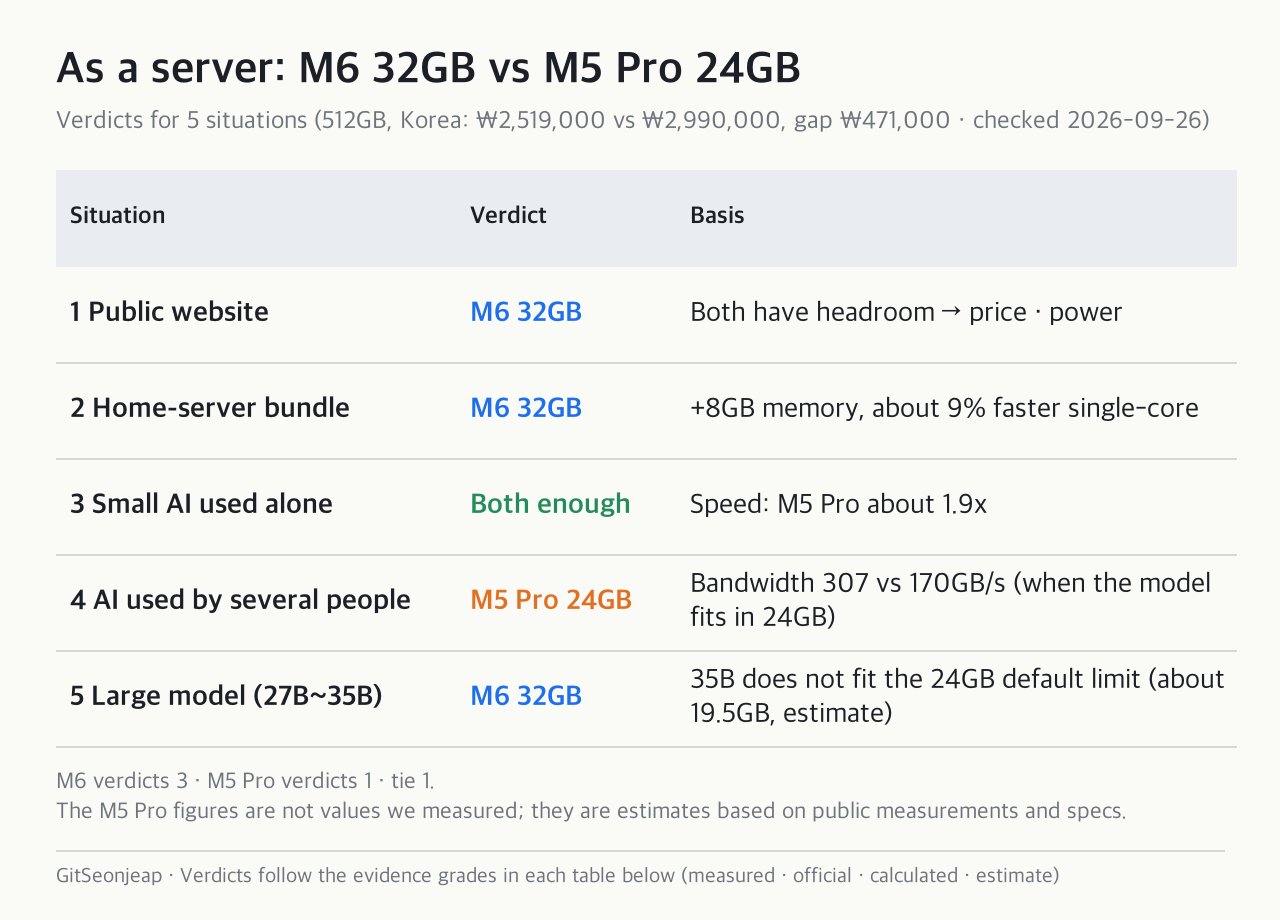
Which is better as a server, the Mac mini M6 32GB or the M5 Pro 24GB? It depends on what you run. For a public website, a bundle of home-server services, or a large AI model, the M6 32GB fits. For an AI server that several people use at once, the M5 Pro fits. For a small AI you use alone, both were enough.
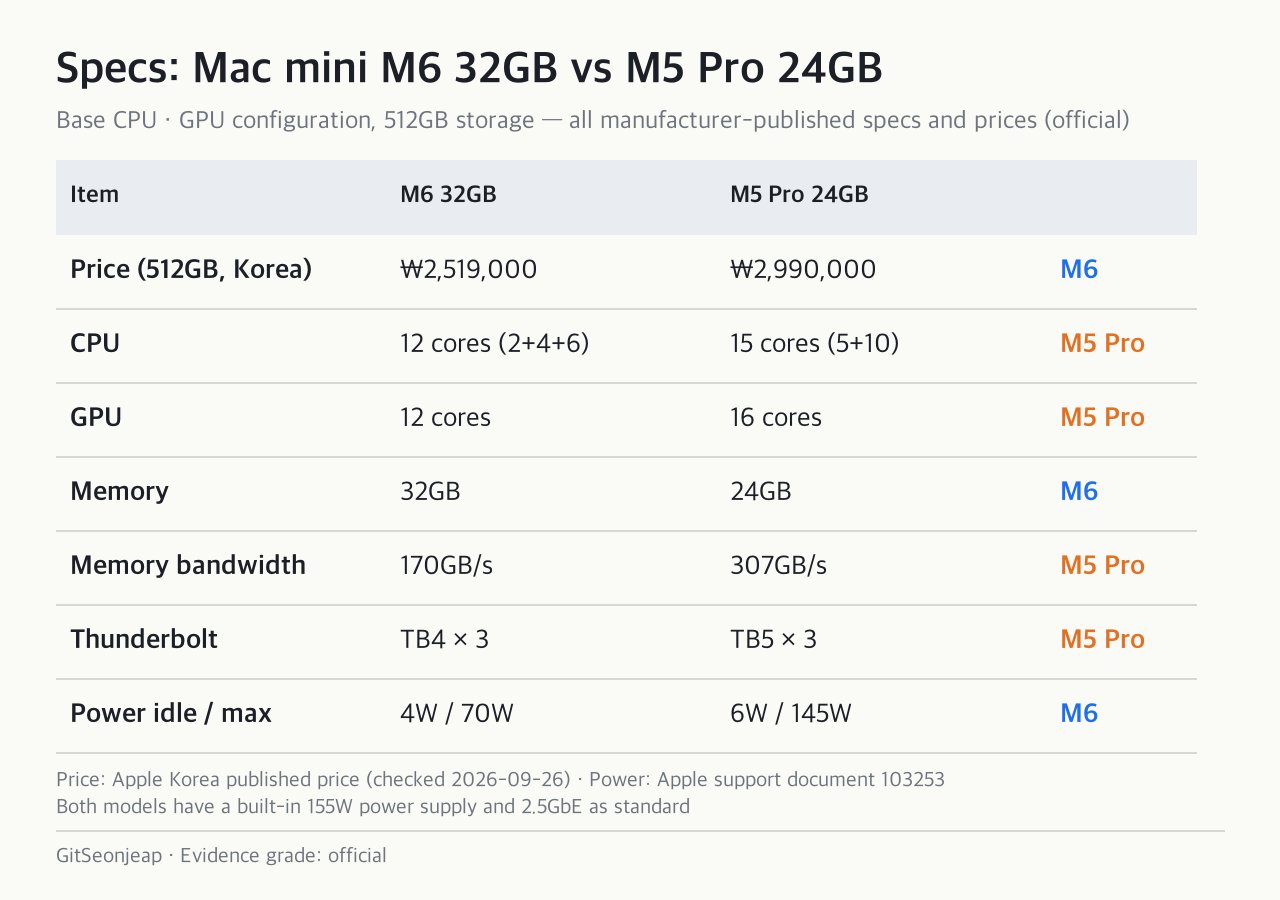
On the recording date (2026-09-26), the gap at 512GB storage was KRW 471,000 in Korea (KRW 2,519,000 vs KRW 2,990,000). The prices shown by Apple Korea on 2026-10-30 are KRW 2,179,000 for the Mac mini M6 32GB (256GB storage) and KRW 2,990,000 for the M5 Pro 24GB (512GB storage). The storage configurations differ, so that is not a like-for-like price gap.
We measured the M6 32GB ourselves. We do not own an M5 Pro, so we compared it using published measurements and specs. Every number carries a grade: measured by us, official, calculated, or estimate. This article rewrites the content of a YouTube video (11 min 46 s), which is narrated in Korean.
The two models at a glance
They look the same outside (155W power supply, 2.5GbE). The difference is inside. For a server, memory capacity (the size of the warehouse) and bandwidth (the width of the warehouse door) matter most. The M6 has 32GB and 170GB/s, and the M5 Pro has 24GB and 307GB/s (official).
Mac mini server for a website and a home-server bundle (situations 1 and 2)
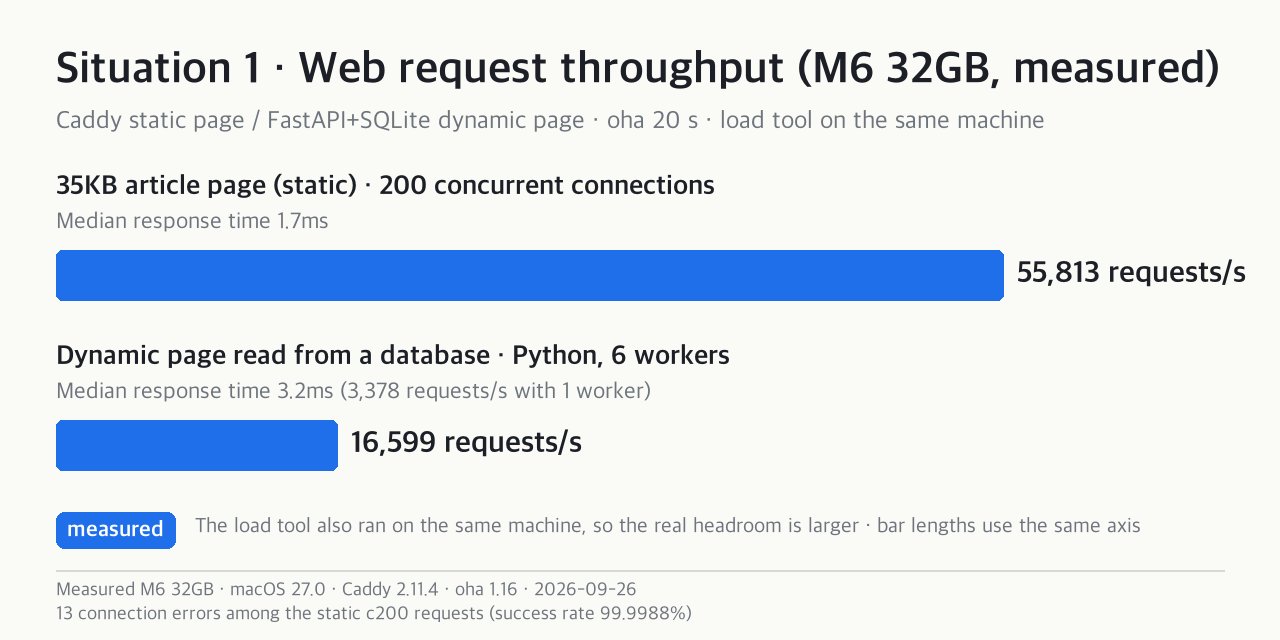
Situation 1: a public website. We requested a 35KB article page from Caddy on the M6 32GB for 20 seconds and got 55,813 requests per second (200 concurrent connections). A dynamic page read from a database (FastAPI+SQLite, 6 workers) reached 16,599 requests per second (all measured by us). The load tool ran on the same machine.
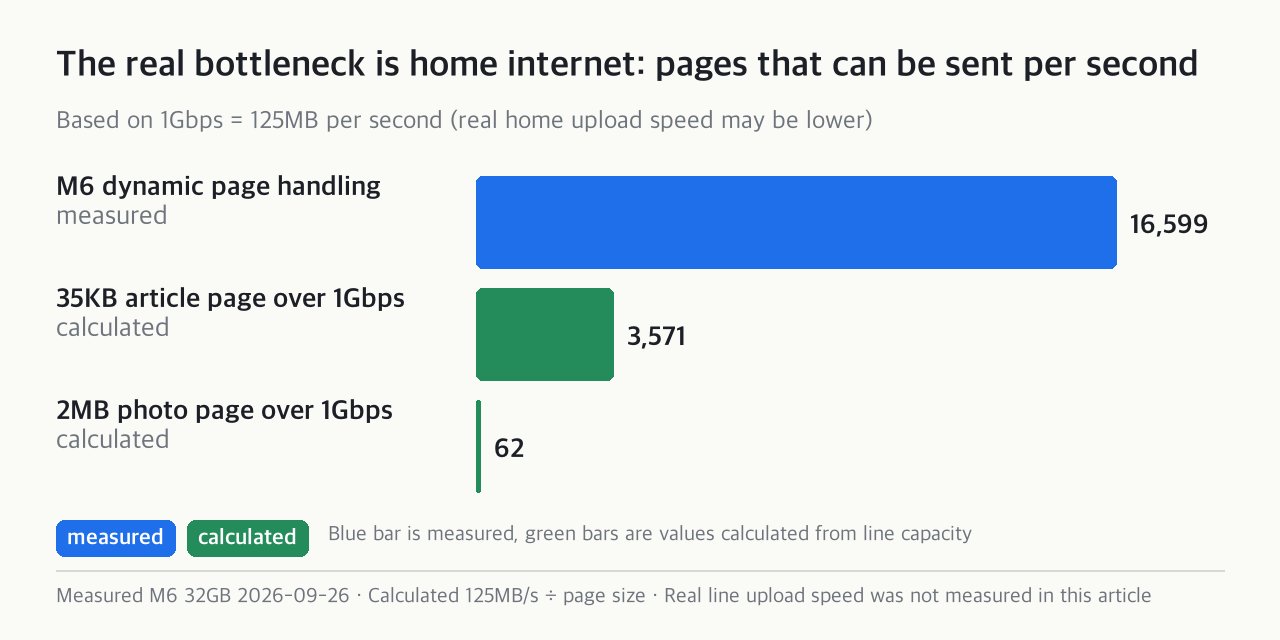
The bottleneck is your home internet. A 1Gbps line (125MB per second) caps out at about 3,571 requests per second for a 35KB page and about 62 for a page with 2MB photos (calculated). The KT terms of service (2025.3, a Korean ISP) also restrict running a commercial server without approval (cited). If both can handle the load, pick the cheaper one that uses less power. At the official standby power of 4W and 6W, a month costs about KRW 750 and KRW 1,100 (calculated). The assumptions are 24 hours a day and 720 hours a month (4W is about 2.9kWh and 6W about 4.3kWh), the residential tier 2 rate of KRW 214.6 per kWh plus a KRW 14 surcharge, multiplied by 1.127 for VAT and fund contributions. The assumption that a household is in tier 2 has no source. In tier 1 the 4W figure would be about KRW 440, and in tier 3 about KRW 1,050.
Situation 2: a home-server bundle. In 387 Reddit server posts, the top use was files and backups, second was media, and third was Docker (not an exhaustive survey). Such a bundle runs out of memory before it runs out of chip. Docker on a Mac runs inside a virtual machine, which reserves memory separately. The M6 has 8GB more memory and about 9% faster single-core performance (public Geekbench 7 comparison, cited, secondary), so the M6 32GB fits.
A small AI you use alone (situation 3)
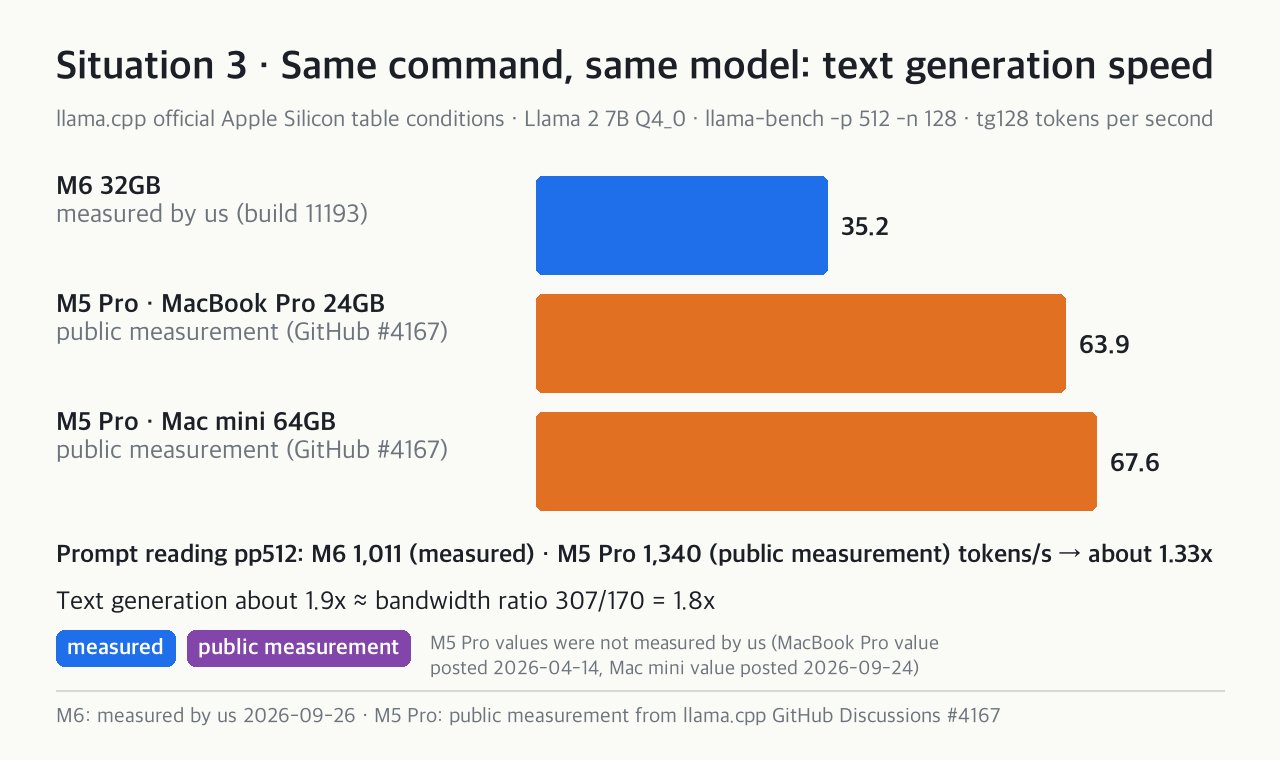
We measured with the same command as the official llama.cpp table (llama-bench, Llama 2 7B Q4_0). Text generation on the M6 32GB is 35.2 tokens/s (measured by us). The M5 Pro scores 63.9 on a MacBook Pro 24GB and 67.6 tokens/s on a Mac mini 64GB, about 1.9x faster (published measurements, GitHub #4167).
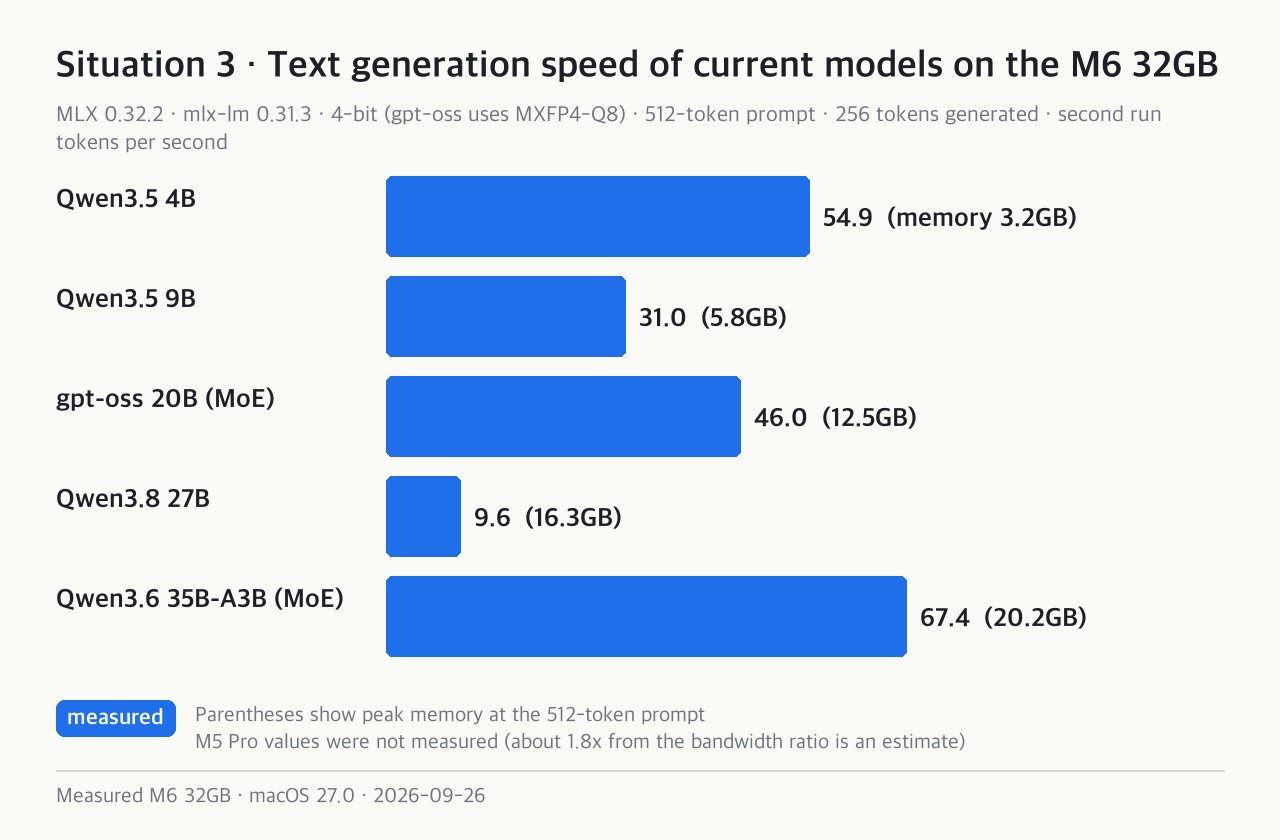
We measured current models on the M6 32GB with MLX 4-bit. Qwen3.5 4B reached 54.9, 9B 31.0, gpt-oss 20B 46.0, Qwen3.8 27B 9.6, and Qwen3.6 35B-A3B 67.4 tokens/s (measured by us). People read at about five or six tokens per second, so the M6 is enough for solo use.
An AI server several people use (situation 4)
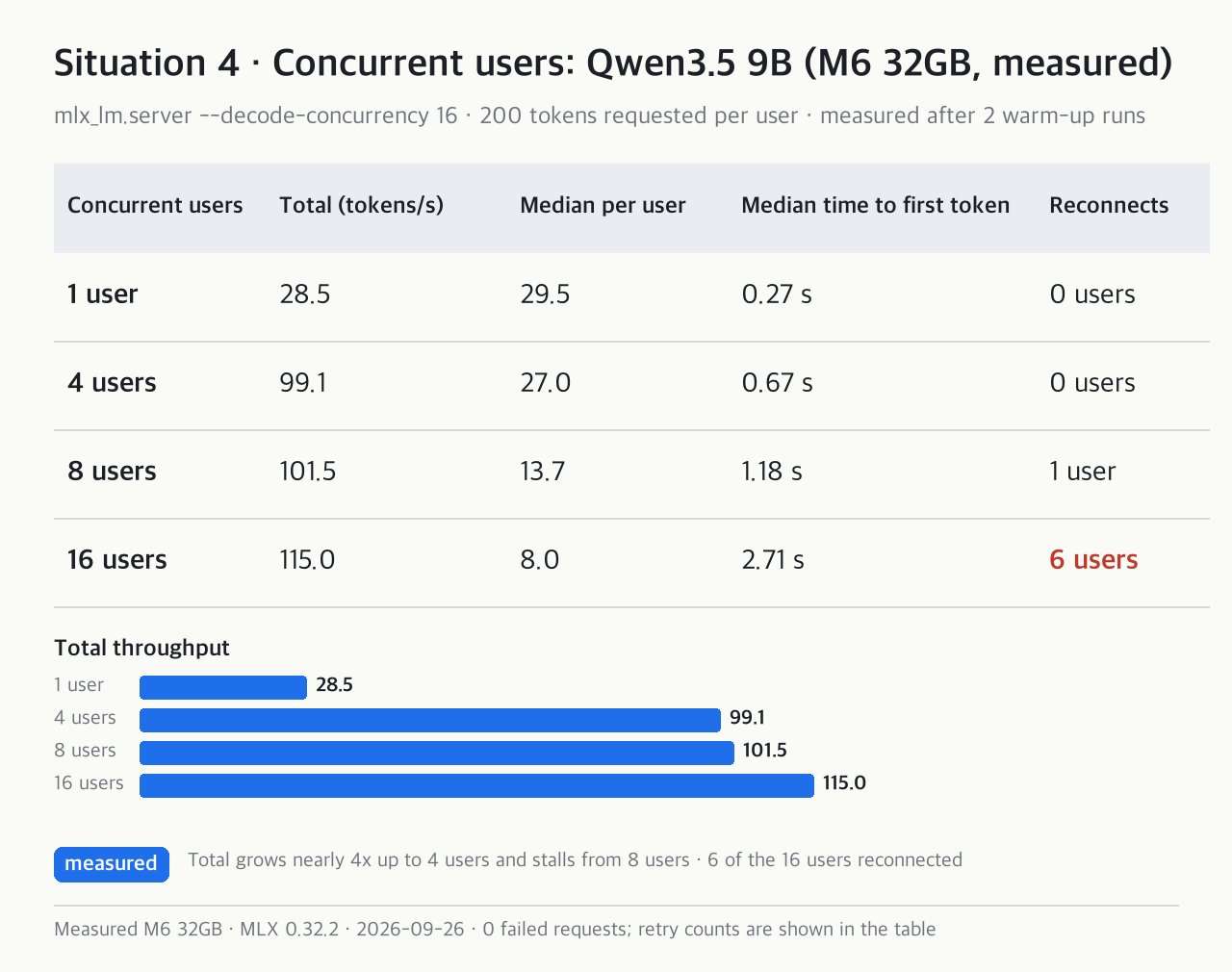
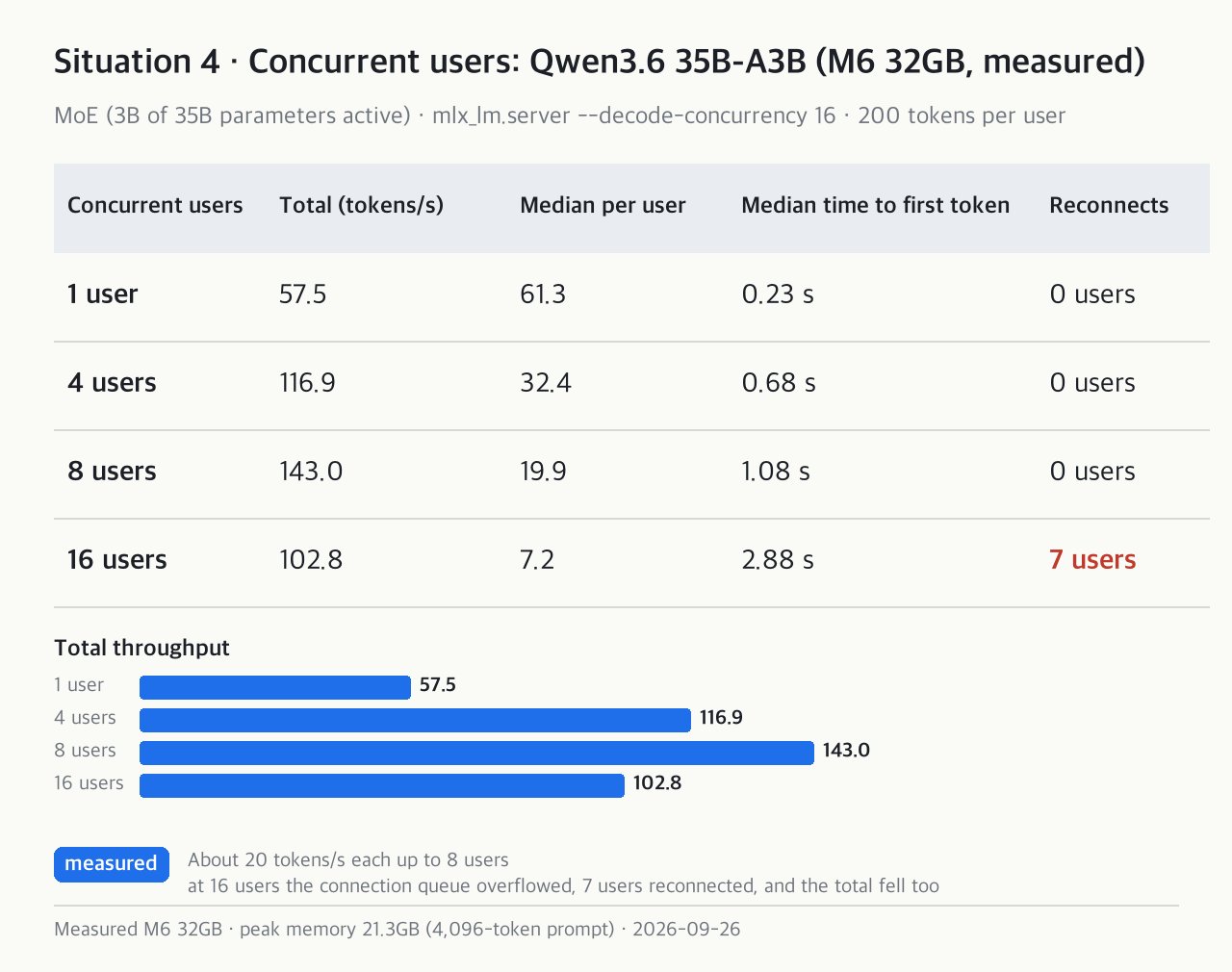
We ran mlx_lm.server (continuous batching of 16) with 1, 4, 8 and 16 users each requesting 200 tokens at the same time. Each cell shows "total · per-user median" (tokens/s, measured by us).
| Concurrent users | Qwen3.5 9B | Qwen3.6 35B-A3B |
|---|---|---|
| 1 user | 28.5 · 29.5 | 57.5 · 61.3 |
| 4 users | 99.1 · 27.0 | 116.9 · 32.4 |
| 8 users | 101.5 · 13.7 | 143.0 · 19.9 |
| 16 users | 115.0 · 8.0 | 102.8 · 7.2 |
With the 9B model, the total grows nearly 4x up to 4 users, then stalls from 8 users. At 16 users each person gets 8 tokens/s (6 users had to reconnect). With the 35B-A3B model, each user had a comfortable 20 tokens/s up to 8 users. At 16 users the connection queue overflowed, 7 users had to reconnect, and the total fell too. A public service needs something that queues requests.
The M5 Pro looks likely to be faster by about the bandwidth ratio of 1.8x, but that is an estimate we did not measure, and 24GB leaves little room for conversation memory (KV cache). A January 2026 report found 175,000 Ollama servers open without authentication (cited), so do not leave the port open as is.
Putting a large AI model on a Mac mini server (situation 5)
A Mac cannot use all of its memory for graphics. The M6 32GB default limit is 26.8GB (about 78%, measured). The 78% counts 32GB as 32GiB (about 34.4GB), and 26.8GB is the same value as 24.96GiB. Applying a similar ratio (74 to 78%) to the M5 Pro 24GB gives about 19.1 to 20.1GB, and the video showed the middle value, about 19.5GB (estimate, not measured).
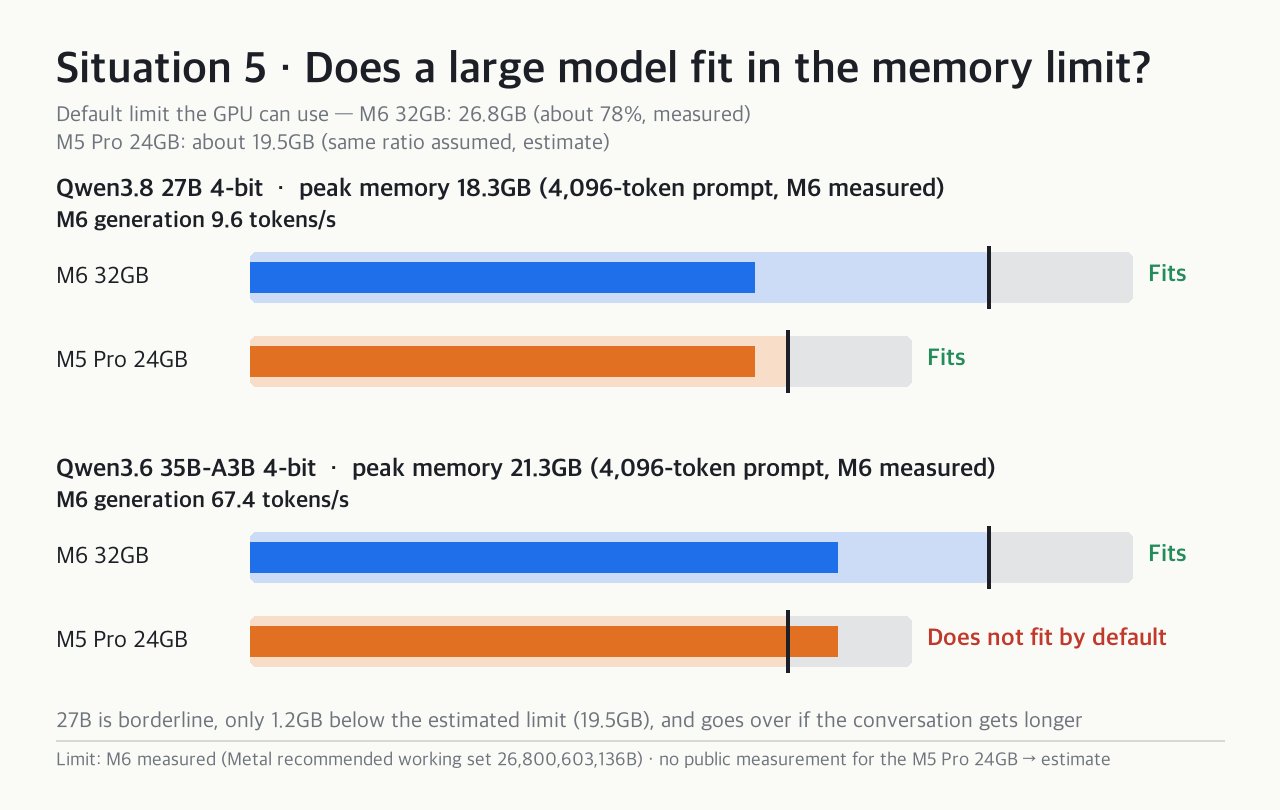
For a 4,096-token prompt, Qwen3.8 27B peaked at 18.3GB and 35B-A3B at 21.3GB (measured by us). The 35B-A3B does not fit the M5 Pro 24GB default setting. The 27B is borderline, with only a 1.2GB margin (19.5 − 18.3, calculated) below the estimated 19.5GB limit. Slow and not fitting are different problems.
How to decide on a Mac mini server: concurrent users → memory → power → limits
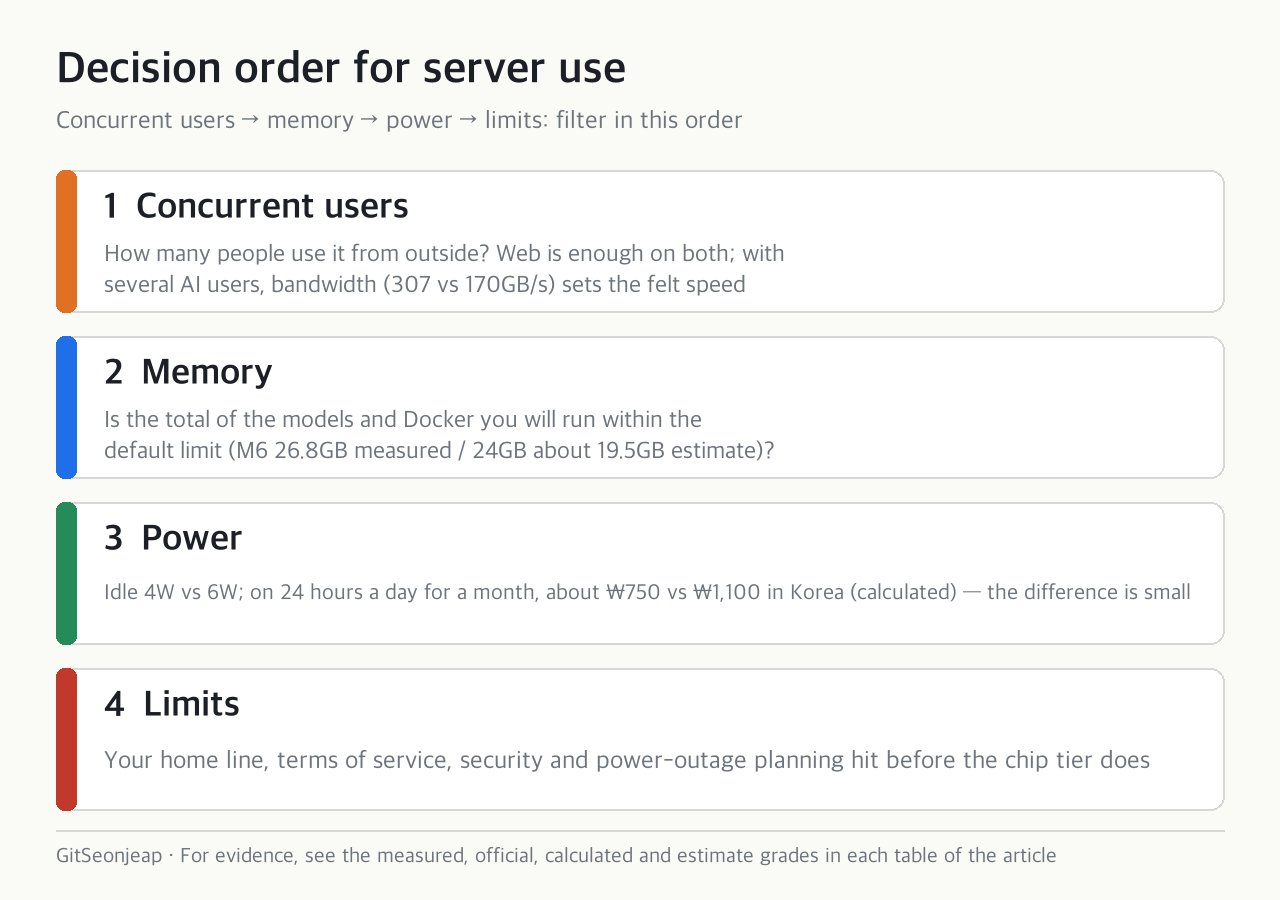
- Concurrent users. First decide how many people use it from outside. If several people use the AI, bandwidth sets how fast it feels.
- Memory. Check that the model you run plus Docker fits within the default limit.
- Power. The difference is small, so this is a tiebreaker when performance is more than enough.
- Limits. The internet line, terms of service, security and power-outage planning hit before the chip does. Check that sleep is off, that the Mac turns on automatically after an outage, and that you have a UPS (community opinion).
Test conditions and what we did not measure
Conditions (M6 32GB, macOS 27.0, 2026-09-26). Web: Caddy 2.11.4 · oha 1.16 · 20 seconds. llama.cpp b11193. AI: MLX 0.32.2 · mlx-lm 0.31.3, 4-bit (MXFP4-Q8 for gpt-oss). Concurrent connections use --decode-concurrency 16.
What we did not measure. A real M5 Pro (replaced with published measurements and estimates), measured power (calculated from official values), real home-line speed, long-run heat, Ollama concurrency, answer quality, and memory with several long conversations.
Summary
| Situation | Key number | Verdict | Evidence grade |
|---|---|---|---|
| 1 Public website | Static 55,813 · dynamic 16,599 requests/s | M6 32GB | Measured by us |
| 2 Home-server bundle | Memory 32GB vs 24GB, single-core about +9% | M6 32GB | Official · calculated |
| 3 Small AI used alone | 35.2 vs 63.9 to 67.6 tokens/s | Both enough | Measured by us · published measurement |
| 4 AI used by several people | 8 tokens/s per user at 16 users, 307 vs 170GB/s | M5 Pro 24GB | Measured by us · estimate |
| 5 Large AI model | 35B 21.3GB vs limit about 19.5GB | M6 32GB | Measured by us · estimate |
The community conclusion is that for most home servers the cheaper Mac mini M6 32GB fits, and the M5 Pro shows its worth at 48GB and above.
Sources and reference date. Measured 2026-09-26. Prices are Apple Korea's published prices (the video's values were checked on 2026-09-26; the 2026-10-30 prices are listed separately in the text). Apple support document 103253 (power) · llama.cpp GitHub #4167 · SentinelLABS/Censys (2026-01) · KT terms of service (2025.3) · tally of 387 Reddit server posts.
This article is based on a video narrated with an AI voice, and AI assisted the writing. This is not a purchase recommendation.