Free ChatGPT-Class Local AI on a 24GB GPU? RTX 3090, 5090, Mac mini
Posted Video released
Can one 24GB GPU (RTX 3090, 4-bit) get into the same league as free ChatGPT? We ran the same questions on a 3090, 5090 and Mac mini M6 and compared memory, speed and quality.
In short, a local AI on par with free ChatGPT gets as far as "the same league" on a single 24GB graphics card (RTX 3090, 4-bit). The character is different, though. Free ChatGPT was short and less wrong. The local Qwen (Qwen3.8 27B) was more detailed but sometimes made things up. It also fits on a Mac mini M6 32GB, but at around 8 tokens/s. The numbers are values we measured on 1 and 2 October 2026, and calculations and citations are marked separately. This article rewrites the measurements from a YouTube video, which is narrated in Korean.
The free-ChatGPT benchmark and how we compared
The benchmark is GPT-5.6 Luna, the model on ChatGPT's free plan (official; the free column of the plan page, checked 2026-10-02). We asked it with "Thinking" both on and off. For the local side, we loaded one model, Qwen3.8 27B, in three forms: original 54.7GB, 8-bit 29.05GB, and 4-bit 17.56GB.
The test is 160 questions we wrote ourselves (8 tasks × 20). From these, 40 random questions (8 tasks × 5) were also given identically to free ChatGPT. However, free ChatGPT allows only 3 image attachments per day, so for the image task we could send only 3 questions, with Thinking on. Answers and code are graded automatically. Hallucination is graded by a person on two standards (lenient / strict). Advice and writing get a 10-point score from an AI judge with the model name hidden.
Public indices (cited) disagree. Artificial Analysis gives Luna 34.56 and Qwen 33.70 at the maximum reasoning setting (27.55 at the medium setting), and Arena Korean gives 1413 vs 1397, with overlapping error ranges. benchlm sees a large gap, 66.2 vs 55.4.
Limits: with only 5 questions per task the sample is small, and advice and writing are scored by an AI judge. After about 20 questions, free ChatGPT's model name switched to a smaller model, so those answers (3 with Thinking on, 4 with it off) were excluded.
Measurements across 3 machines
| Machine | Model · quantization | Memory | Generation speed | Quality (160 questions) |
|---|---|---|---|---|
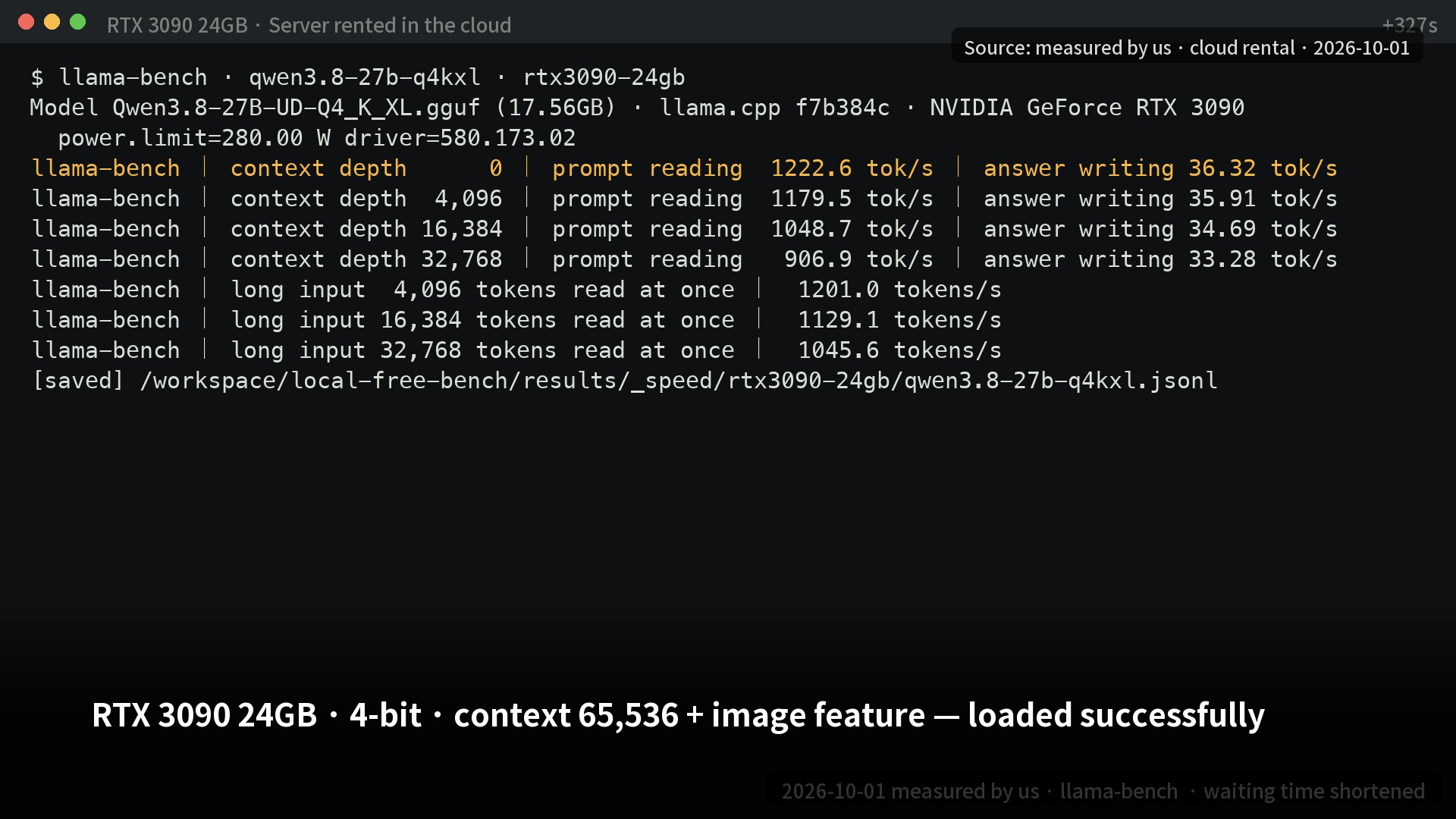
| RTX 3090 24GB | 4-bit | Up to 21,838MiB (context 65,536) | 36.3 tokens/s | Korean facts 15/20 · coding 20/20 · advice 5.67 |
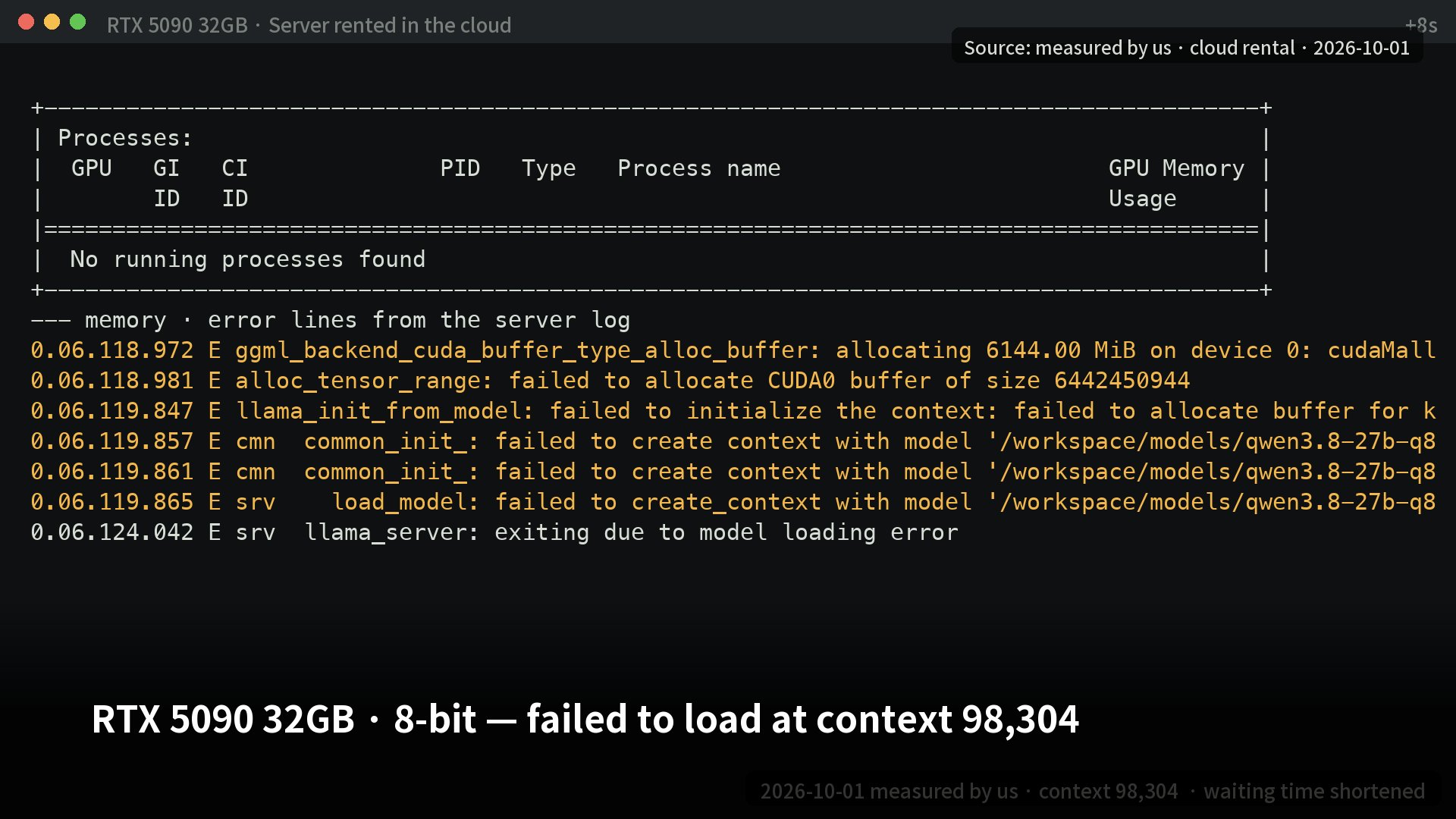
| RTX 5090 32GB | 8-bit | 31,891MiB (context 65,536, 716MiB spare) | 52.7 tokens/s | Korean facts 16/20 · coding 20/20 · advice 5.53 |
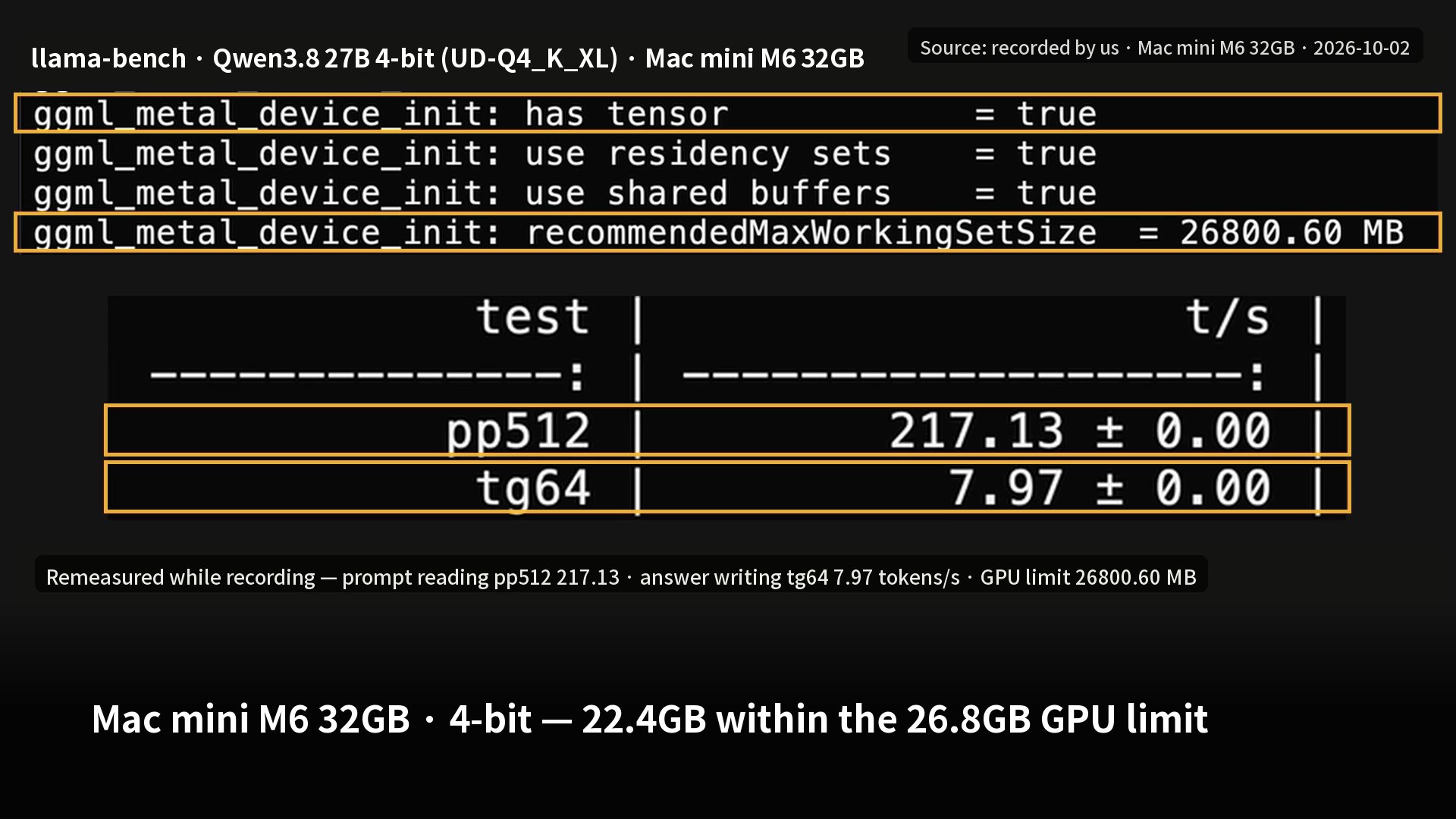
| Mac mini M6 32GB | 4-bit llama.cpp | 22.36GiB (context 32,768) | 8.17 tokens/s | Not tested |
| Mac mini M6 32GB | MLX 4bit | Up to 20.14GB (context 32,768) | 9.21 tokens/s | Not tested |
| For reference: DGX Spark 128GB | Flash-Next 4-bit | 67,067MiB (context 131,072) | 28.6 tokens/s | Korean facts 19/20 |
All values are measured by us. Speed is for solo use at context depth 0 (3090 limited to 280W, 5090 to 575W), with speculative decoding (MTP) off. The memory figure uses the context setting in parentheses, and the measuring method differs by machine, so do not compare them directly. Advice is a 10-point AI-judge score.
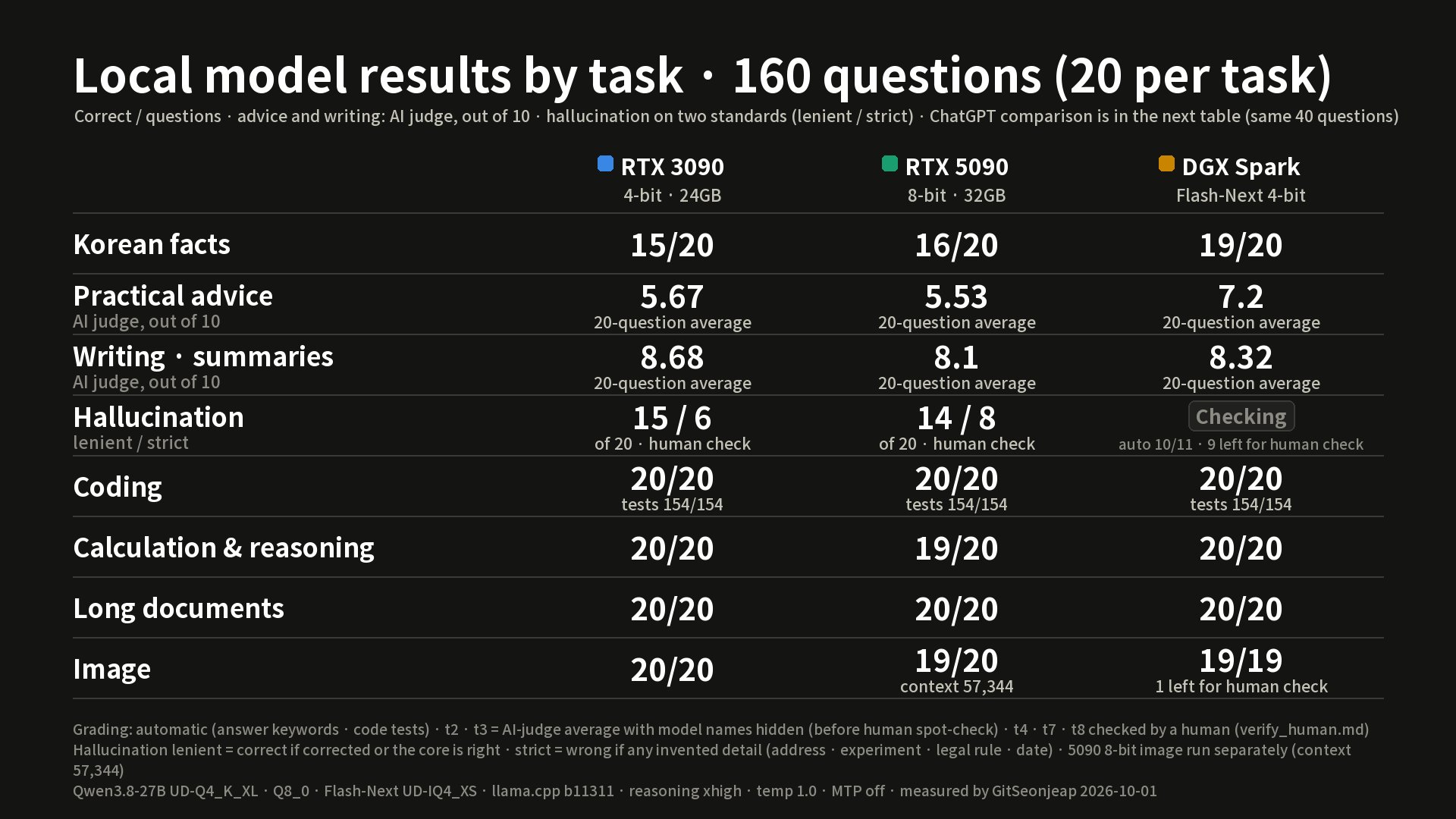
What each machine's result means
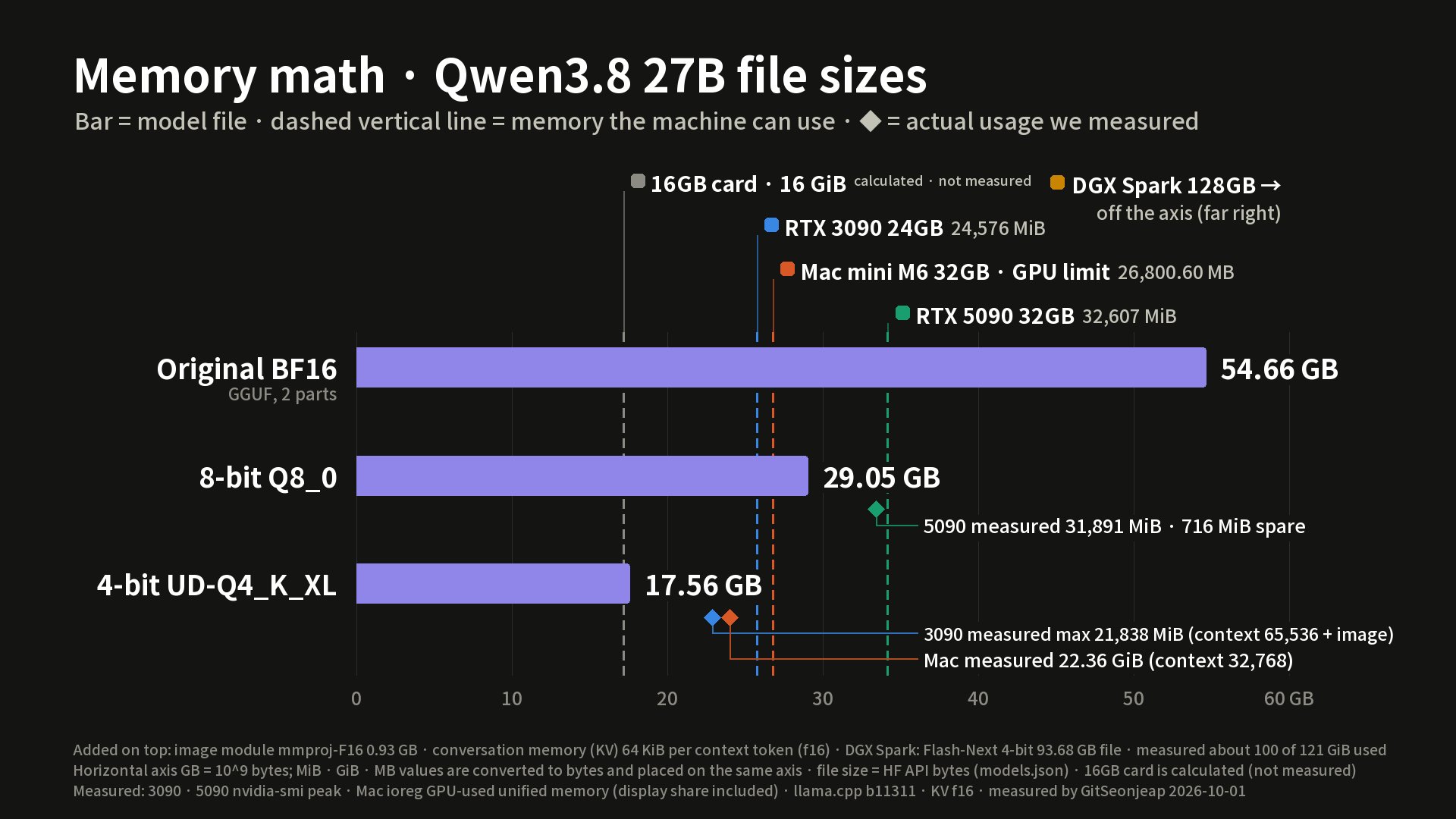
RTX 3090 24GB. The 4-bit file (17.56GB) fit with a context of 65,536 and the image feature turned on, and it worked through all 160 questions to the end. Memory peaked at about 89%, with no context overflow and no server restarts. It solved all 20 coding questions, and each question has hidden tests, so all 154 tests passed too (the 20/20 in the table counts questions, and 154 counts tests).
RTX 5090 32GB. The 8-bit version only just fits. While solving 55 text questions, the server went down the moment an image question arrived. When we cut the context to 57,344, 20 image questions ran normally. With the image feature off, a context of 98,304 failed to load at all. The 4-bit version, measured for speed only, ran at 77.0 tokens/s, about 46% faster than 8-bit (calculated).
Mac mini M6 32GB. The 4-bit file fit within the 26.8GB GPU limit. Generation is about 22% of the 3090's speed, and swap grew to 9GB while the model was loaded. On the 3090 run, one question averaged 2,479 tokens, so on the Mac one question takes about 5 minutes (calculated).
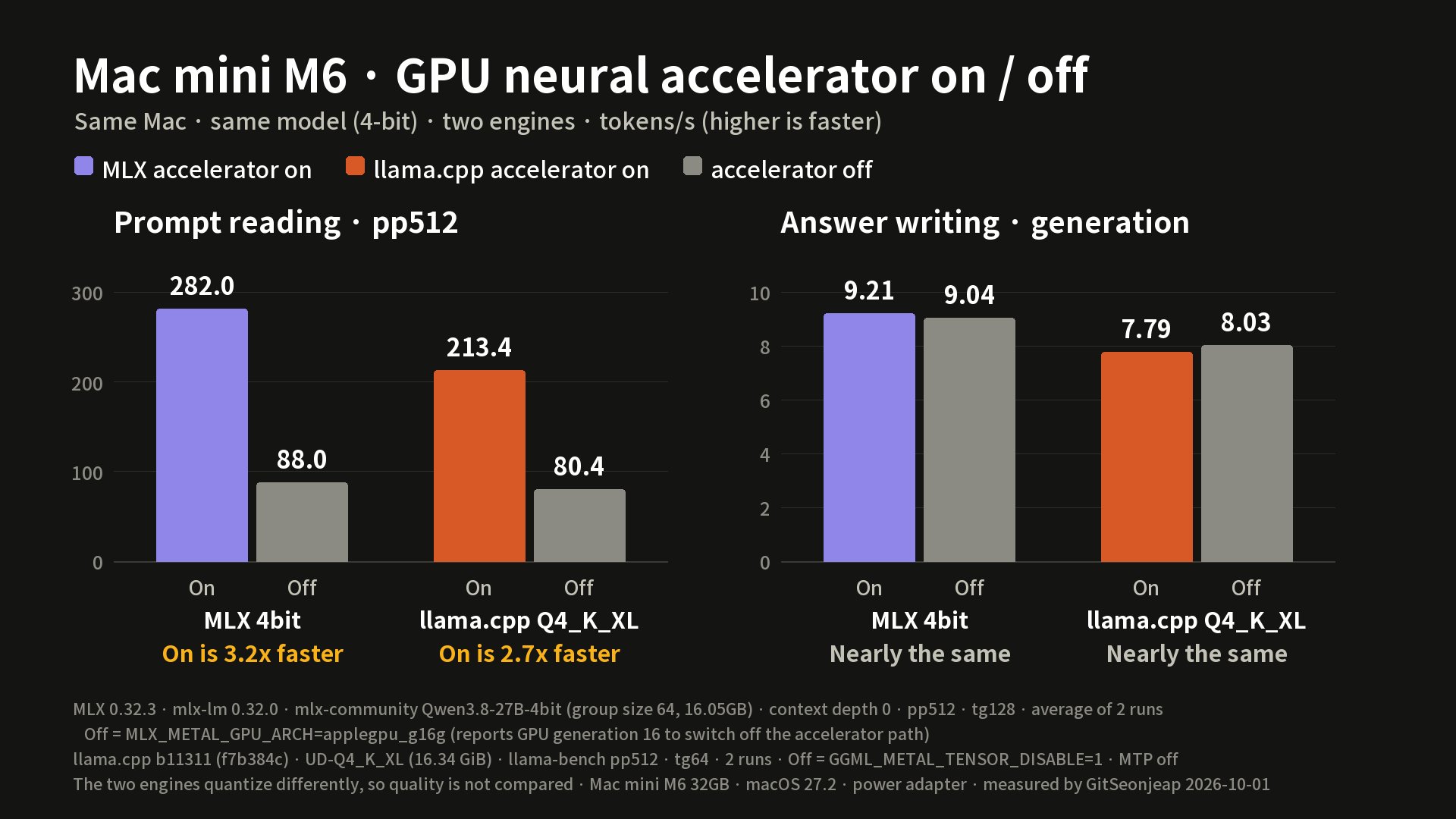
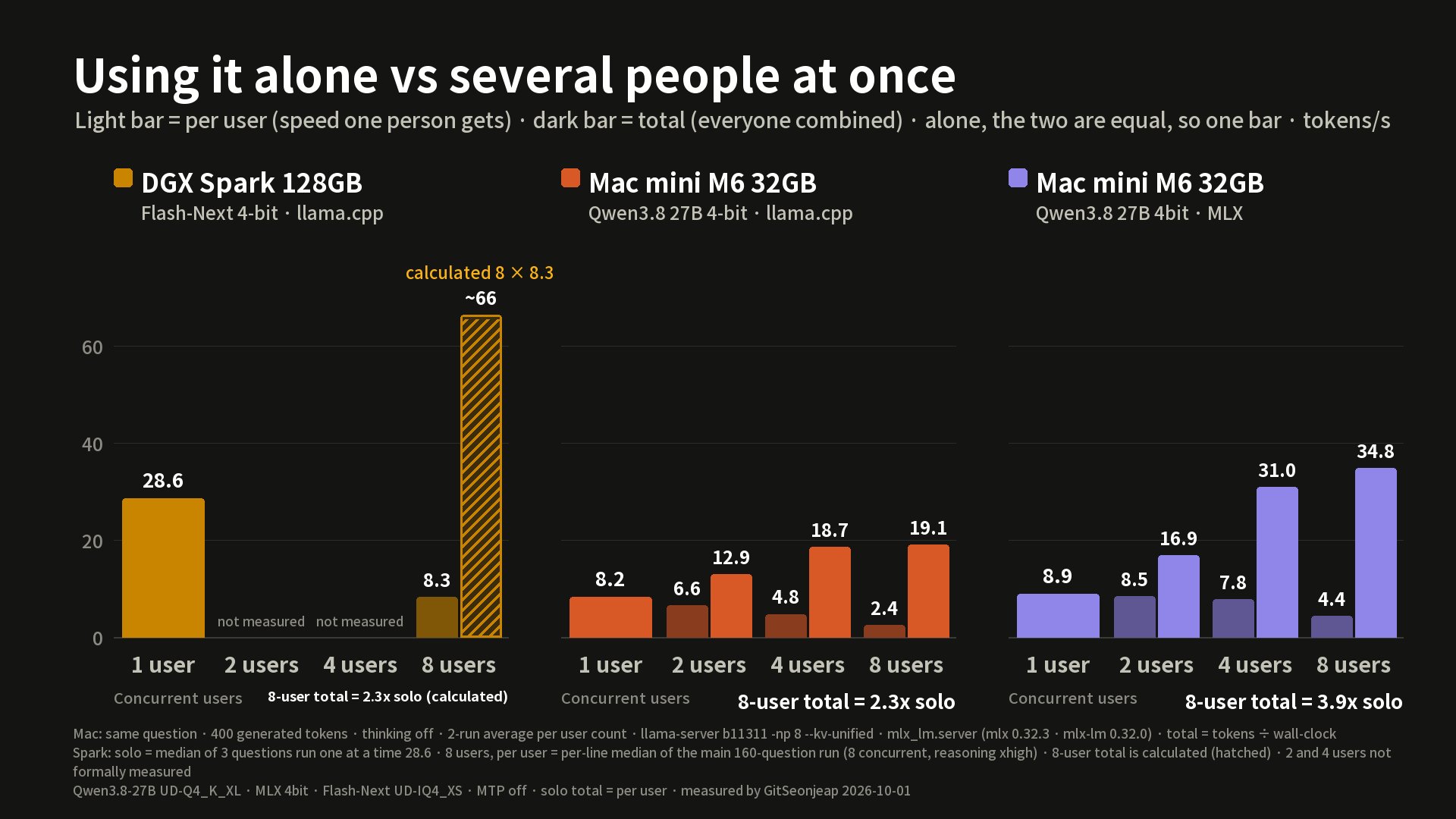
Turning off the M6's GPU neural accelerator slows only prompt reading. With MLX it is 282 vs 88 tokens/s (about 3.2x), while answer writing is the same at 9.21 vs 9.04. When 8 people use it at once, the total is 19.1 tokens/s with llama.cpp and 34.8 with MLX.
The same 40 questions compared
Of the 8 tasks, the image task had only 3 questions on ChatGPT, so we put it on a separate line at the bottom. The advice scores differ between the 3-machine table above (3090 5.67, 5090 5.53) and the table below (7.6, 6.0). The table above is the average of the 20 advice questions among the 160. The table below is the same 5 advice questions rescored with the model names hidden, together with ChatGPT's answers. The questions and the scoring rounds differ, so the two cannot be compared with each other.
| Task (5 questions) | ChatGPT Thinking on | ChatGPT Thinking off | 3090 4-bit | 5090 8-bit |
|---|---|---|---|---|
| Korean facts | 5/5 | 5/5 | 4/5 | 4/5 |
| Advice (out of 10) | 6.6 | 6.3 | 7.6 | 6.0 |
| Writing (out of 10) | 6.7 | 6.5 | 8.4 | 7.9 |
| Hallucination (lenient / strict) | 5/5 | 5/5 | 3/1 | 3/2 |
| Coding (questions) | 5/5 | 5/5 | 5/5 | 5/5 |
| Calculation and reasoning | 5/5 | 4/5 | 5/5 | 4/5 |
| Long documents | 4/5 | 5/5 | 5/5 | 5/5 |
| Image | 3/3 (3 questions only) | Not sent (limit) | 5/5 | 5/5 (context 57,344) |
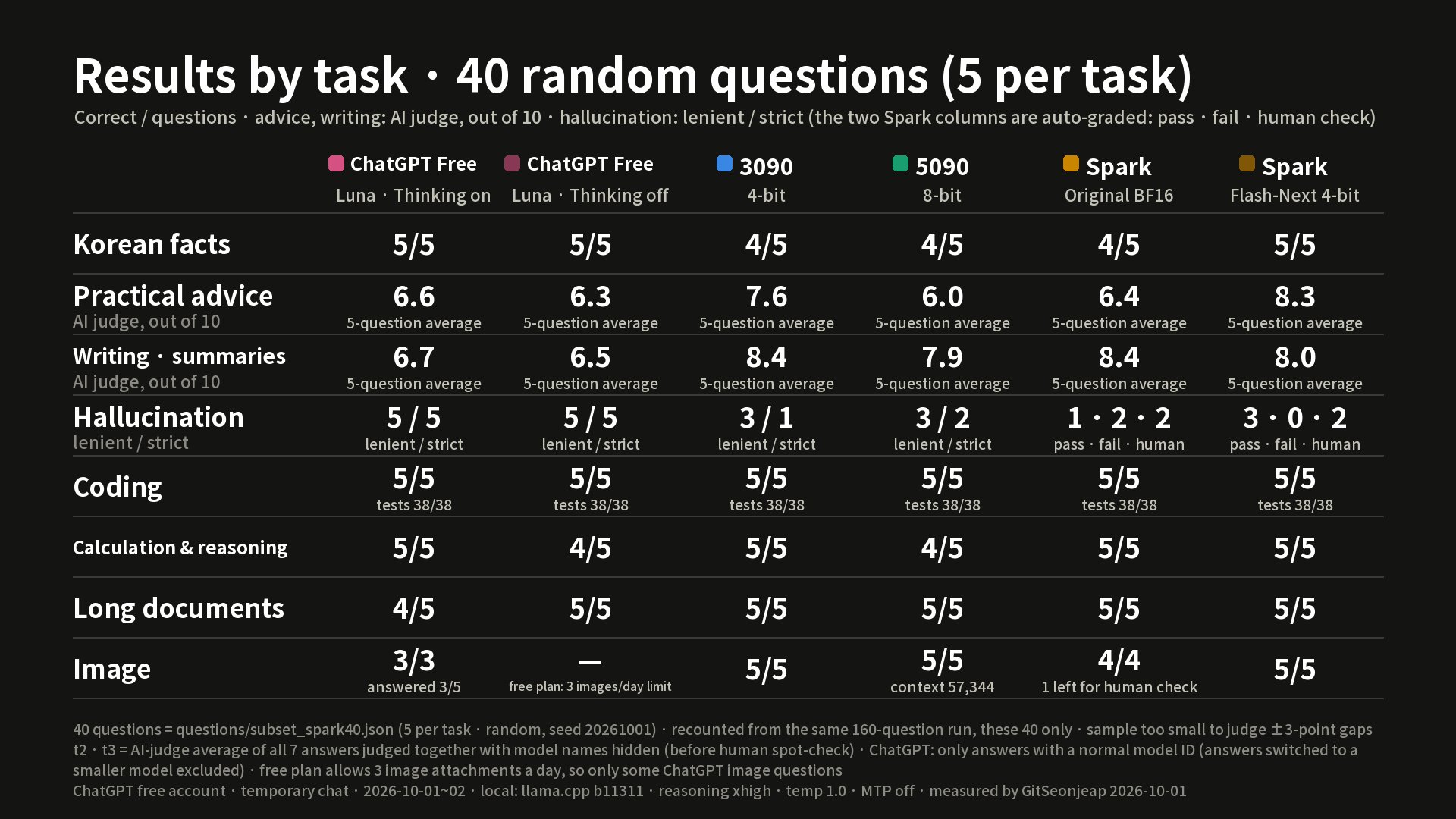
The local model loses in three places: Korean facts, invented details, and waiting time. On Korean facts, asked who appears on the KRW 5,000 note (Korea), the correct answer is Yi I. The 4-bit model answered with a name that does not exist, and the 8-bit model answered Shin Saimdang. On waiting time, one advice question took a median of 280 seconds on the 3090, versus a median of 4 seconds (maximum 31) on free ChatGPT. However, ChatGPT searched the internet when needed and attached sources, while the local model answered without internet.
It wins in two places: the AI-judge scores for advice and writing (it wrote in more detail), and the fact that it all happens inside your own machine with no usage limit.
Options for free-ChatGPT-class local AI, and the limits
- A graphics card with 24GB or more: the 4-bit version fits. Check Korean facts, laws and numbers separately.
- A 32GB Mac: it fits, but at around 8 tokens/s it is limited to short solo use.
- 16GB or less: hard, because the 4-bit file (17.56GB) also needs room for conversation memory (calculated, not measured).
- Around 128GB: the larger Flash-Next 4-bit runs (measured on a rented DGX Spark in the cloud).
A free-ChatGPT-class local AI is "in the same league" only on the premise that it has a different character. The deciding question is whether you give up speed or accuracy.
Sources, reference date and limits
- Measured: 2026-10-01 to 02. The graphics cards and the DGX Spark were cloud rentals, and the Mac mini is a machine we own. llama.cpp 11311, MLX 0.32.3, reasoning xhigh
- Official: the ChatGPT plan page. Cited: Artificial Analysis v4.3.2 · Arena Korean · benchlm. Calculated: ratios, elapsed times, required memory
- This is as of the video's publication date (2026-10-02). Models, plans and limits may change afterward.
This article is based on a video narrated with an AI voice, and AI assisted the writing. This is not a purchase recommendation.