Mac mini M6 16GB vs 24GB vs 32GB: Which to Buy? 8 Uses Tested
Posted Video released
Which Mac mini M6 to buy, 16GB, 24GB or 32GB? We measured 8 uses on a 32GB unit. 24GB and 16GB are simulated, local AI is estimated. The split is model size.
Which Mac mini M6 to buy, 16GB, 24GB or 32GB? For everyday use it barely mattered. Where the choice split was local AI model size. Memory pressure for 8 uses, from web browsing to cloud AI apps, was mostly green. Only the simulated 16GB turned yellow, at 60 browser tabs. This article rewrites the measurements from a YouTube video, which is narrated in Korean.
Disclosure first. The only machine we actually measured is one 32GB unit. The 24GB and 16GB values are "simulations" made by pinning memory. Local AI on 24GB and 16GB was not measured but calculated as an "estimate."
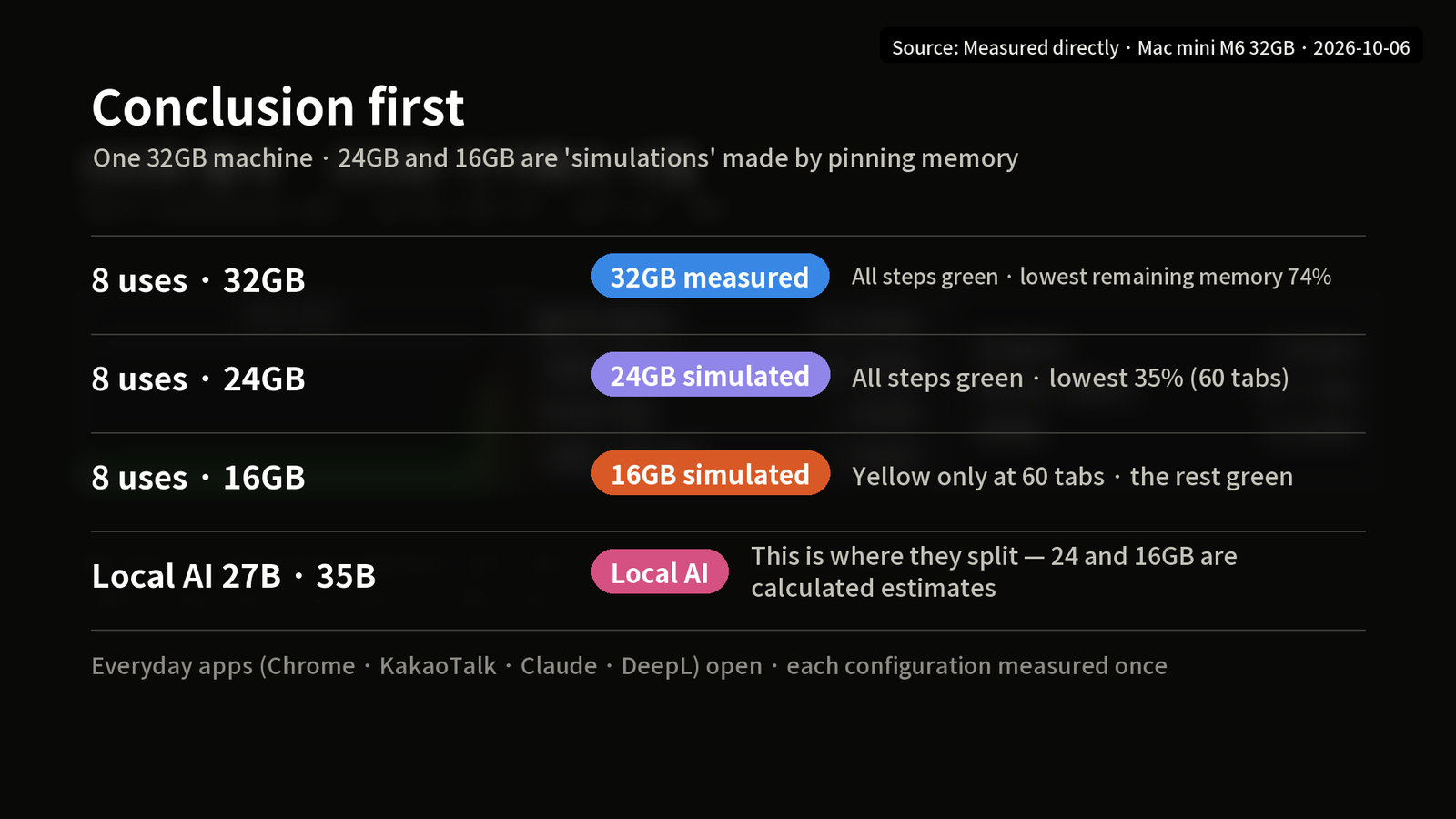
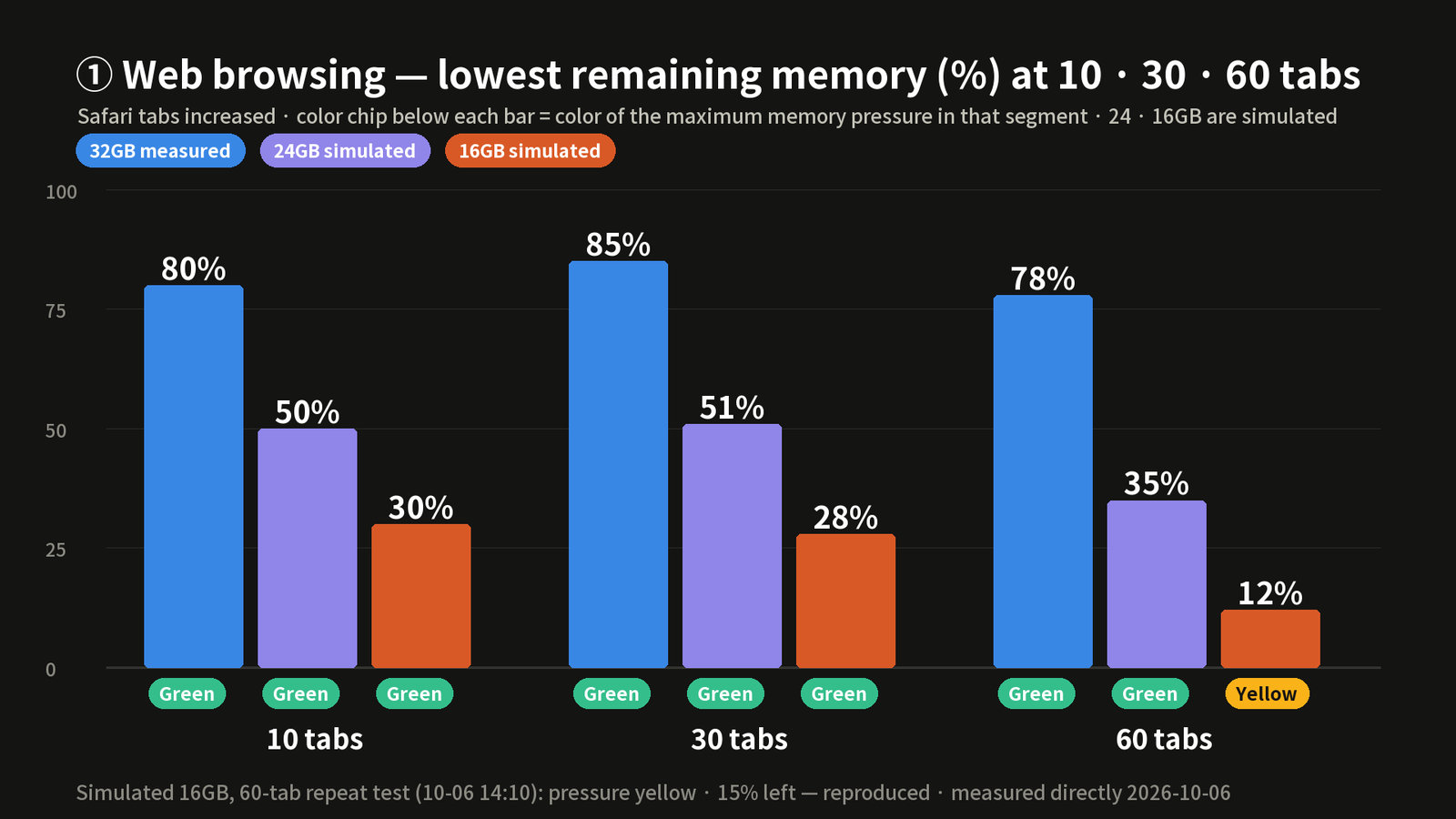
How to read these measurements (measured, simulated, estimate)
On 2026-10-06, on one 32GB (256GB storage) machine with Chrome, KakaoTalk, Claude and DeepL open, we raised the workload one step at a time.
- Measured: values we measured directly on the 32GB machine
- Simulated: 24GB and 16GB made by pinning 8GiB and 16GiB of memory. We could not reproduce the slower memory speed of the 16GB model (153GB/s, versus 170GB/s for 24GB and 32GB)
- Estimate: values derived by calculation (16GB speed = multiplied by the bandwidth ratio of 0.90)
- Cited: published measurements from elsewhere
For memory pressure, green means comfortable, yellow means the system has started to squeeze, and red means critical.
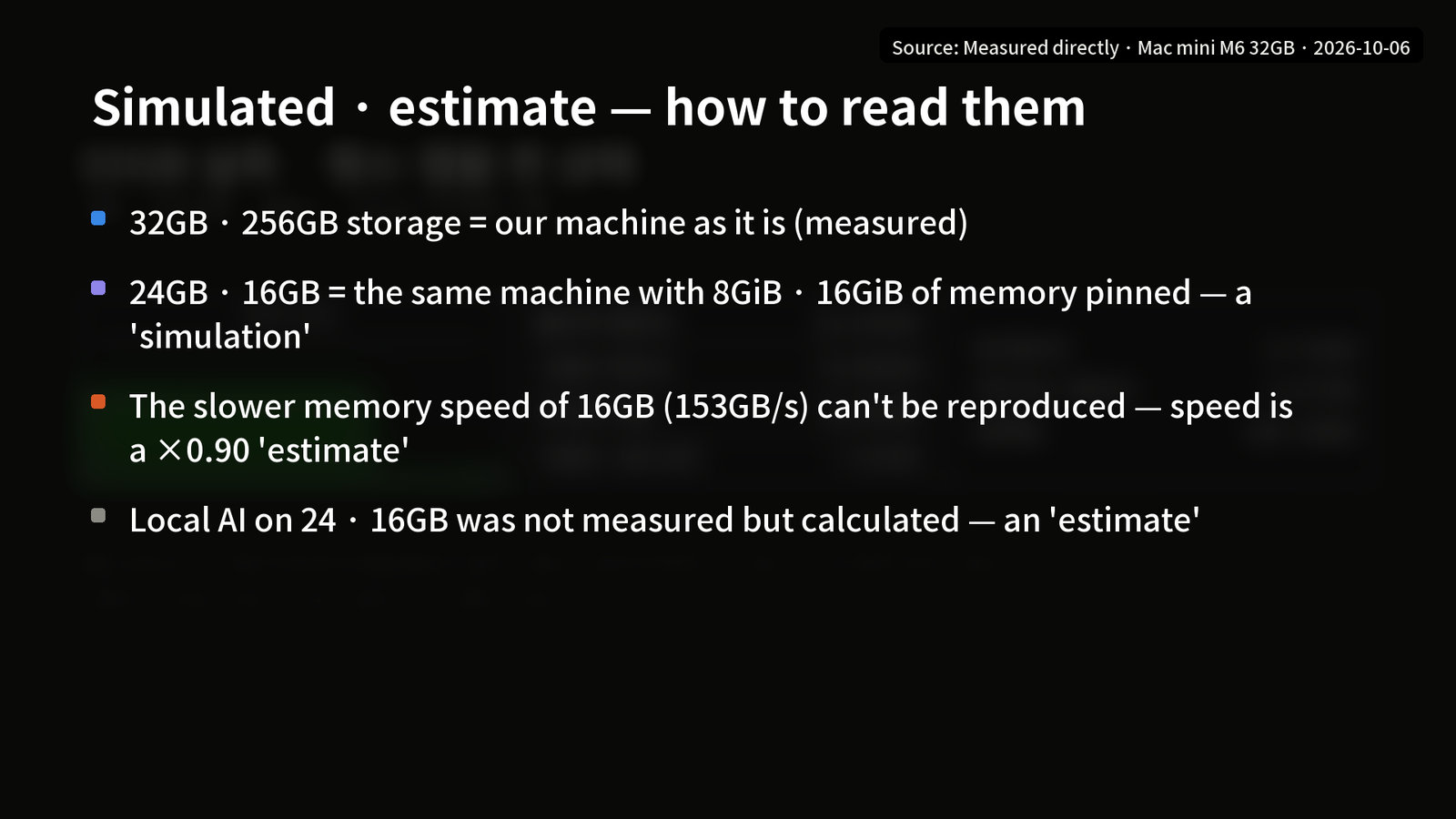
Results for the 8 uses of the Mac mini M6
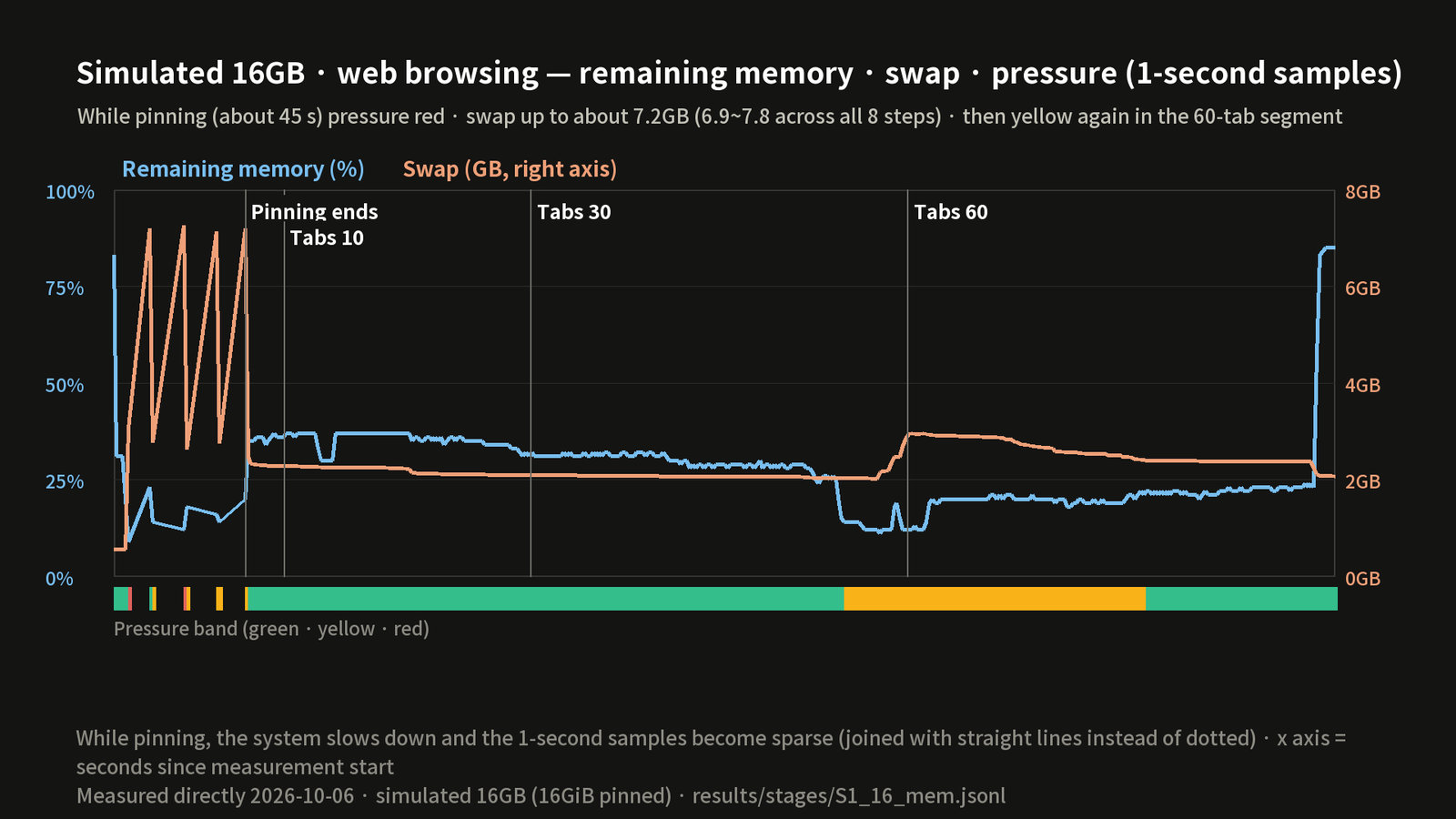
On 32GB, all 8 steps were green when measured (lowest remaining memory 74 to 78%). The simulated 24GB was also all green (lowest 35%). The simulated 16GB was yellow only at 60 browser tabs.
| Use (lowest remaining memory) | 32GB measured | 24GB simulated | 16GB simulated |
|---|---|---|---|
| ① Web browsing (60 tabs) | Green 78% | Green 35% | Yellow 12% |
| ② Documents and office work | Green 75% | Green 48% | Green 21% |
| ③ YouTube 4K and music | Green 74% | Green 46% | Green 20% |
| ④ Games (chess only) | Green 76% | Green 49% | Green 29% |
| ⑤ Photo editing (built-in app) | Green 76% | Green 47% | Green 25% |
| ⑥ Video editing (replaced with 4K encoding) | Green 75% | Green 47% | Green 26% |
| ⑦ Development (Swift build) | Green 75% | Green 54% | Green 24% |
| ⑧ Cloud AI app | Green 76% | Green 47% | Green 22% |
The lowest remaining memory in the table is the 60-tab segment for ① web browsing. For the others, it is the lowest value from 15 seconds after the memory was pinned until the end. (Across the whole step, the simulated 16GB in ① dropped to 11%.)
App switching (181 to 206ms) and 4K encoding (about 46 seconds) were the same on all three configurations, and the Swift build (12.0 / 9.3 / 12.3 seconds) is within noise.
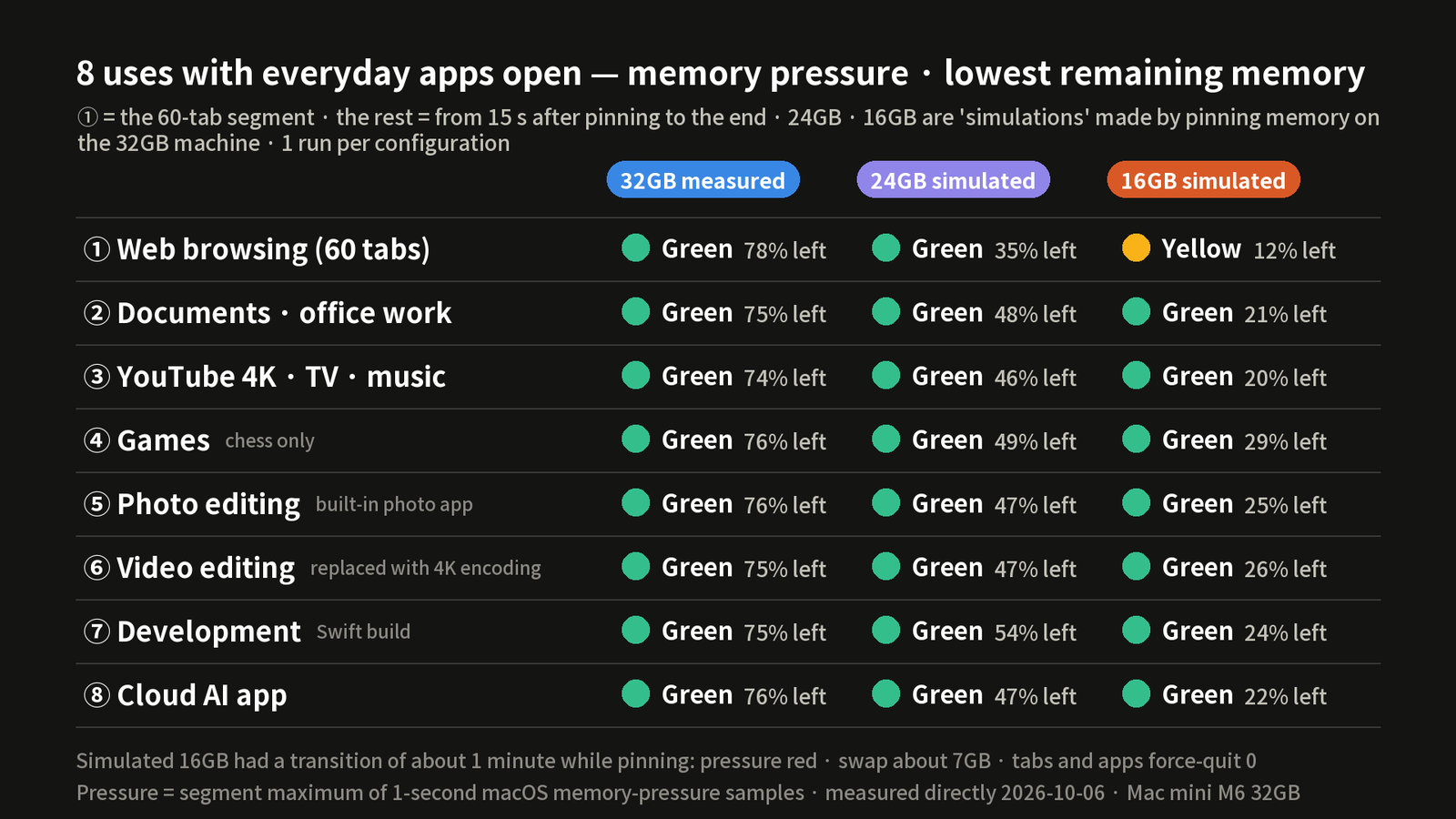
Where the simulated 16GB turned yellow: 60 web tabs
As we raised the tabs to 10, 30 and 60, the simulated 16GB stayed green through 30 tabs (28%) and turned yellow at 60 (12%). A second run was also yellow (15%), and there was no record of tabs being forced closed.
At the moment we pinned 16GB, pressure went red, swap grew to about 7GB, and more than 20GB was written to the internal SSD. That is the cost of suddenly taking away memory that was already in use. It is not what a real 16GB Mac looks like.
Where they split: local AI model size
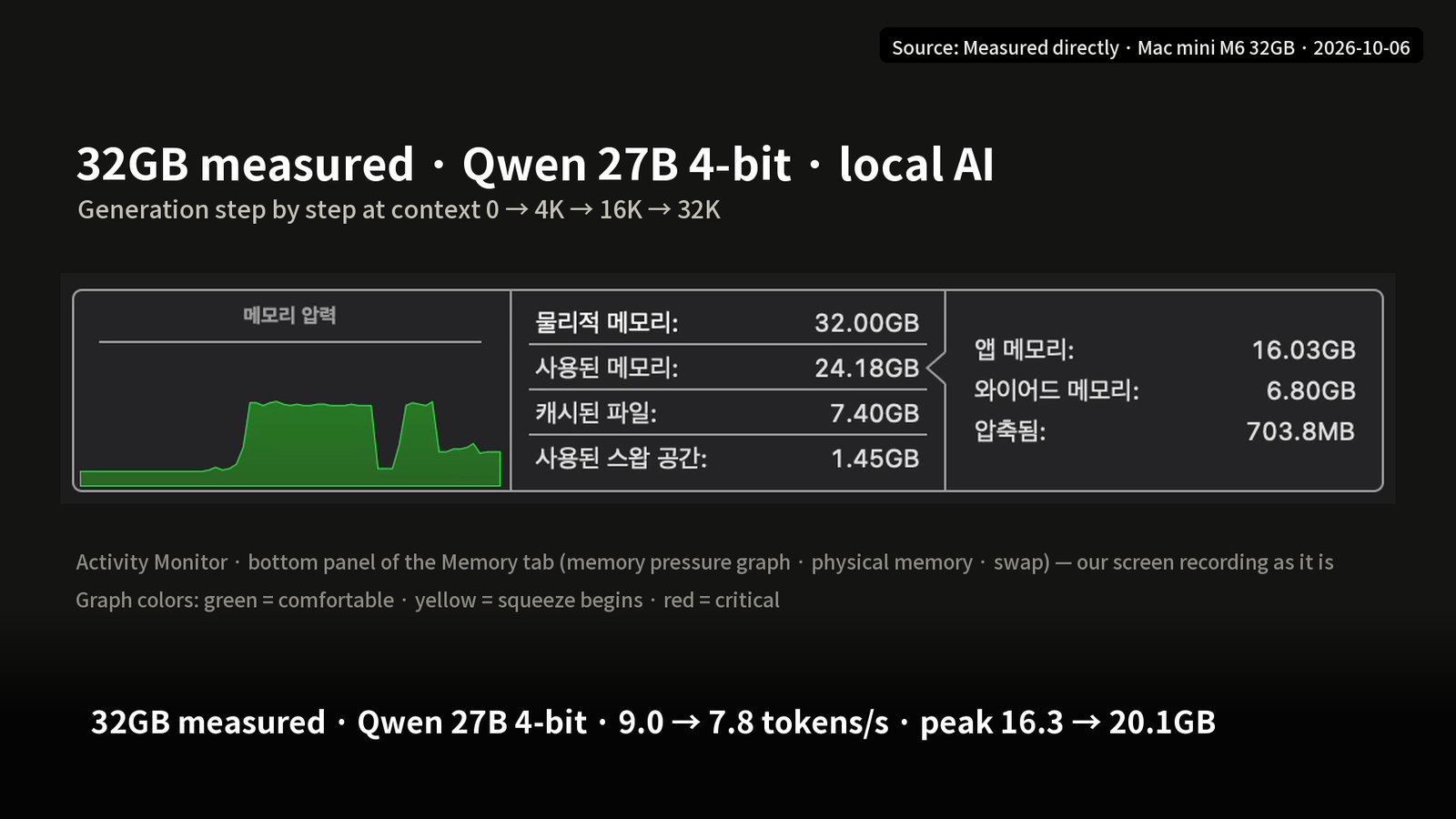
These are 32GB measurements (MLX, one run each, context 0 to 32K tokens).
- Qwen 27B 4-bit: 9.0 → 7.8 tokens/s, peak memory 16.3 → 20.1GB (measured on October 6, context 0 → 32K. The 9.6 in our other article is from September 26 at context 512, and 9.21 is from October 2. The dates and measurement conditions differ, so even the same machine and the same model give slightly different numbers. We could not identify a cause other than these differences in conditions.)
- 35B-A3B 4-bit: 66.1 → 47.8 tokens/s, peak 20.2 → 21.9GB, pressure yellow at a 4K-token context
- Qwen3.5 9B 4-bit (measured on September 26): 31 tokens/s (context 512), peak 6.65GB (context 4K)
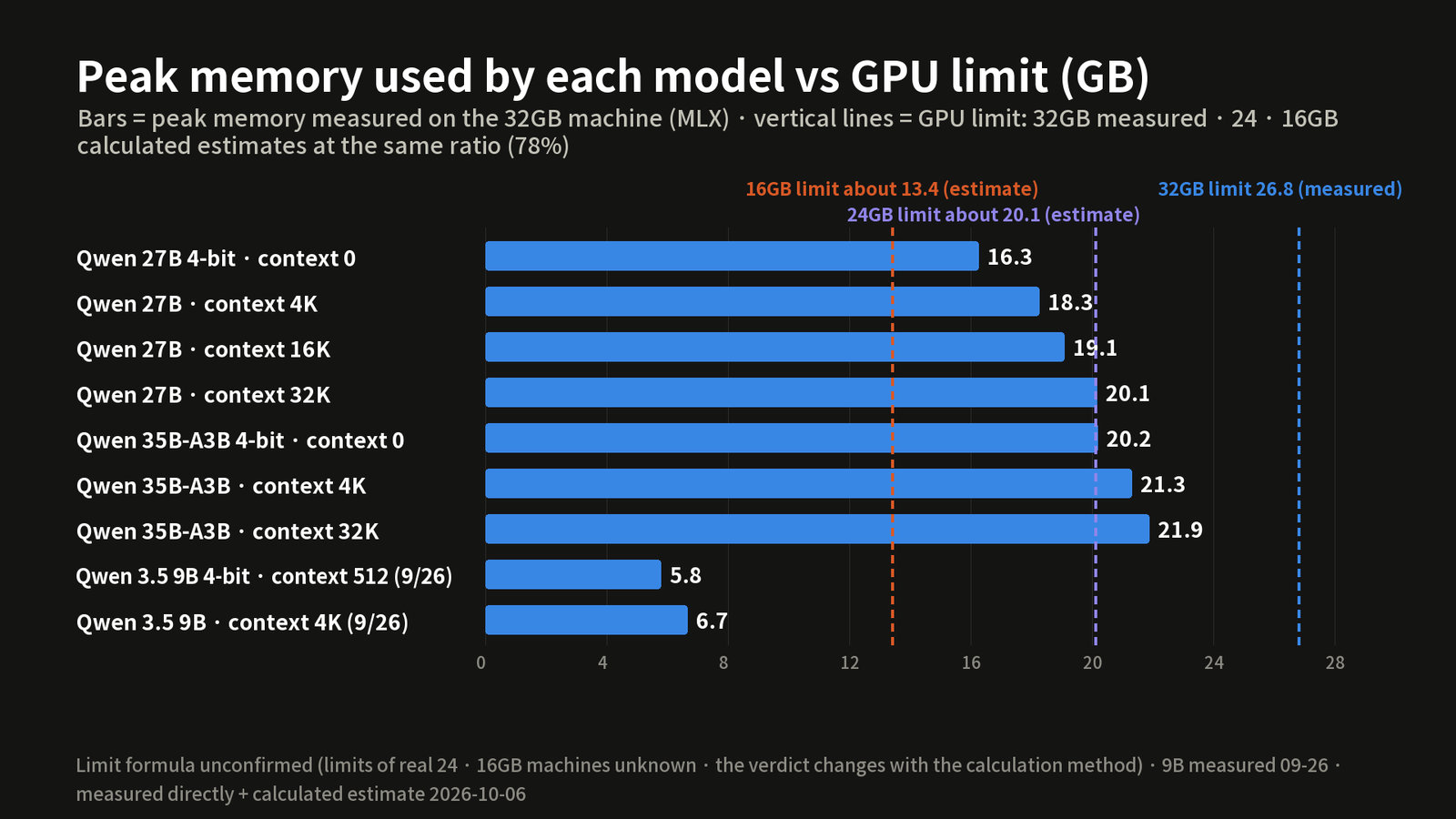
We calculated 24GB and 16GB. The GPU limit of the 32GB machine is 26.8GB (24.96GiB, 78% of the total, a measured value). The 78% counts 32GB as 32GiB (about 34.4GB). At the same ratio, 24GB (24GiB) gives about 20.1GB (18.72GiB) and 16GB (16GiB) gives about 13.4GB (12.48GiB). The GB values for the limit are in units of 10^9 bytes.
| Model · context | 32GB measured peak | 24GB estimate (limit 20.1) | 16GB estimate (limit 13.4) |
|---|---|---|---|
| 27B · context 4K | 18.3GB | Fits | Does not fit |
| 27B · 16K | 19.1GB | Fits (little room) | Does not fit |
| 27B · 32K | 20.1GB | Borderline | Does not fit |
| 35B-A3B · context 0 | 20.2GB | Borderline | Does not fit |
| 35B-A3B · 4K | 21.3GB | Over | Does not fit |
| 9B · 4K | 6.65GB | Fits | Fits |
The 9B speed on 16GB is 31 tokens × 0.90, about 28 tokens/s (estimate). We could not confirm the limit formula. With a different calculation method, the 27B on 24GB would be "borderline to over" from a 4K context, so treat this as a direction only.
Price and storage: the same-price trap
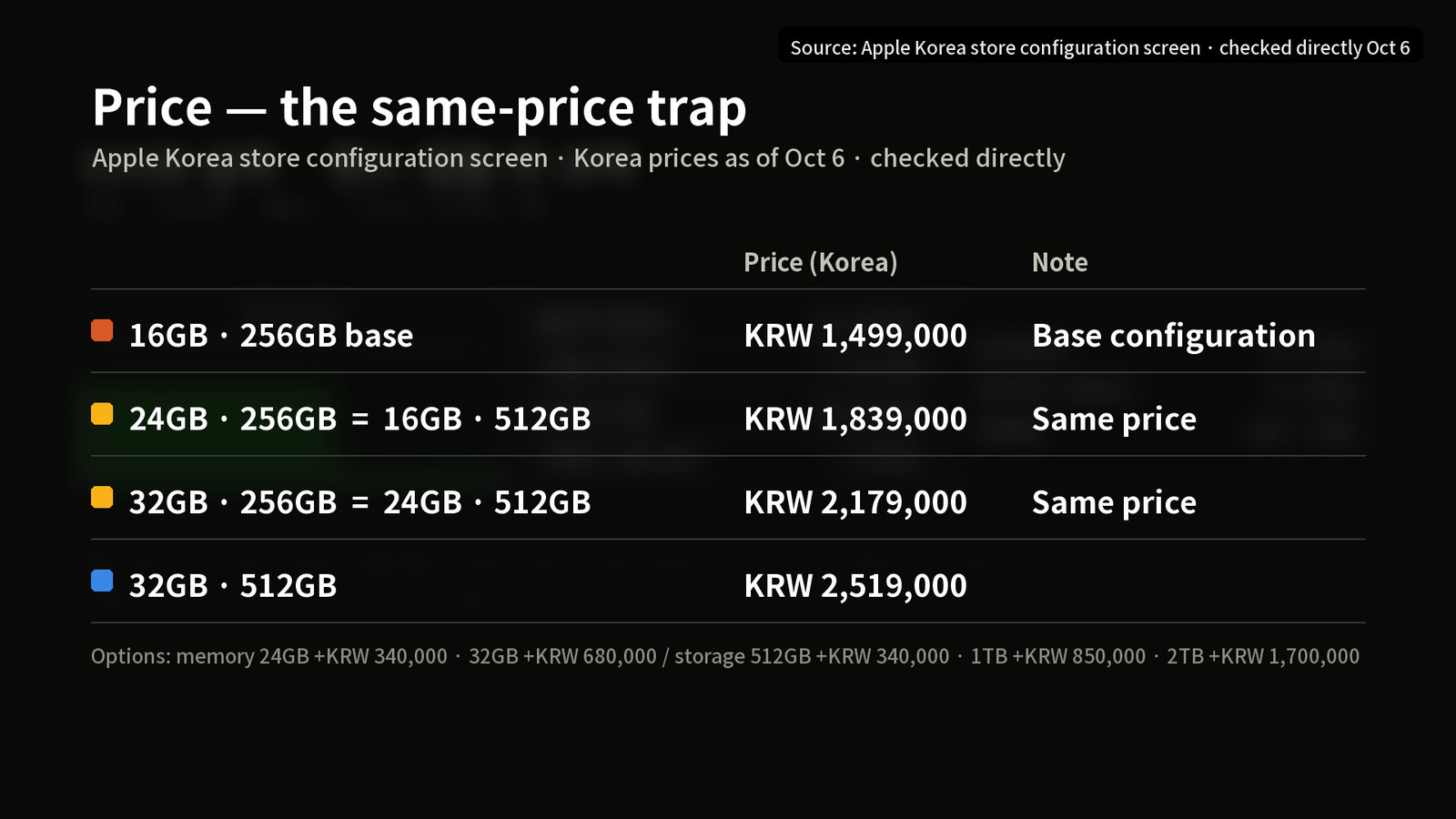
These are values we checked on the Apple Korea store configuration screen on 2026-10-06 (Korean prices). Prices can change. When we re-read the three 256GB prices from the same configurator on 2026-10-30 (16GB KRW 1,499,000 · 24GB KRW 1,839,000 · 32GB KRW 2,179,000), there was no change.
- 16GB · 256GB base KRW 1,499,000 / memory options 24GB +KRW 340,000 · 32GB +KRW 680,000, storage 512GB +KRW 340,000
- 24GB · 256GB = 16GB · 512GB = KRW 1,839,000
- 32GB · 256GB = 24GB · 512GB = KRW 2,179,000 / 32GB · 512GB = KRW 2,519,000
The structure is that raising memory drops storage one step, and raising storage drops memory one step.
The 256GB internal SSD scored 2,580MB/s write and 2,642MB/s read in an 8GiB sequential test. There is a published measurement (MacRumors) that the 256GB model is about half as fast as the 512GB model, but we did not have a 512GB model, so we could not compare directly (cited). It matters because swap is written to this SSD.
How to choose Mac mini M6 memory, in order
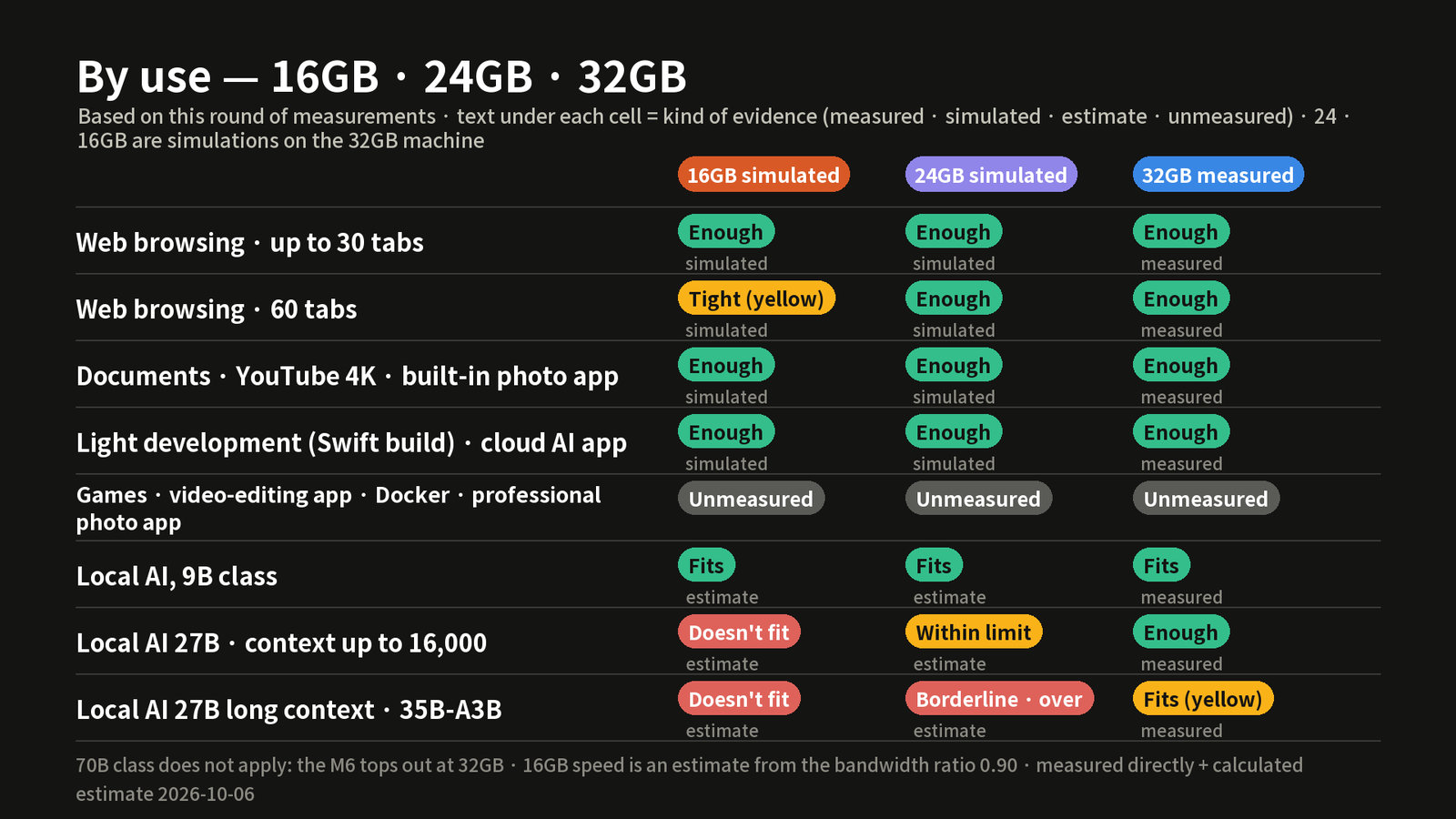
- Start with everyday use. Web, documents, YouTube, the built-in photo app, light development and cloud AI apps were green even on the simulated 16GB (simulated values).
- Do you open 60 tabs at a time? If so, 24GB was safe. The simulated 16GB turned yellow here.
- Do you use local AI? The 9B class fits even on 16GB (estimate). The 27B fits on 24GB up to a context of about 16K tokens (estimate). Beyond that, or for the 35B, choose 32GB. The 35B reached yellow even on 32GB.
- Is your budget fixed? The video concluded that it seems right to raise storage first if you mostly do everyday tasks, and memory first if local AI is the goal (for reference only).
- Hold off on uses we could not measure. We did not measure games, video-editing apps, Docker, virtual machines or professional photo apps. A PetaPixel review noted stuttering in Lightroom export on a 16GB review unit but attributed it to software (cited). 70B-class models do not apply, because the M6 tops out at 32GB.
What we did not measure · sources · reference date
- Not measured: games (chess only), video-editing apps (replaced with ffmpeg 4K encoding), Docker, the iOS simulator, dropped 4K frames, and Claude app switching time
- Limits: we measured each configuration only once, and Chrome's memory shrank over time, so the 16GB column may have been favored. We could not confirm the GPU limit of real 24GB and 16GB machines.
- Conditions: macOS 27.2 · plugged in · MLX 0.32.3
- Sources: Apple Korea Mac mini specs (official) · MacRumors 2026-09-22 · PetaPixel 2026-09-21
- Reference date: video published and measured 2026-10-06, prices checked 2026-10-06. Check the latest price on the Apple Korea store before you buy.
This article is based on a video narrated with an AI voice, and AI assisted the writing. This is not a purchase recommendation.