MiniMax H3 Best Settings on One RTX 5090: 7 Problems Making an AI Short
Posted Video released
The MiniMax H3 settings chosen while making a 20-minute AI short on one RTX 5090, fixes for repeated dialogue, stray voices and wide-shot positions, and measured SageAttention results.
While making a 20-minute AI short film, "90 Seconds" (15 scenes, 198 clips), on a single RTX 5090, we looked for the best MiniMax H3 settings and worked through the problems that actually came up. Of the settings, the one that changed speed the most was the Turbo LoRA, and most of the other problems turned out to be "quality rules" that have nothing to do with the GPU. This post reorganizes the content of the YouTube video so it is easier to read.
Conclusions first
- We used the int8 version of the video model, and a per-mode Turbo LoRA for speed. Character-reference shots used ref2v 8-step, and insert shots that start from a first frame used fl2v 4-step. Both are for 768p, so we matched the resolution to 1344x768.
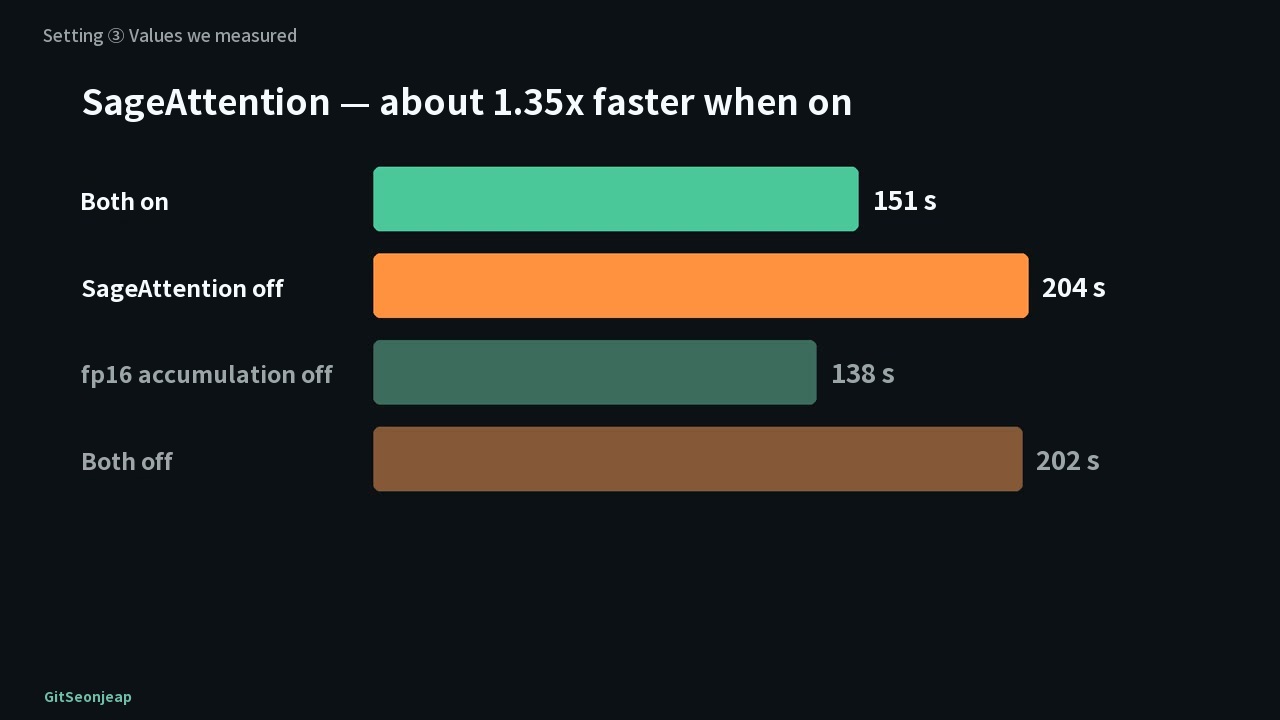
- Turning SageAttention off makes a segment about 1.35 times slower (151 s to 204 s), so we keep it on. fp16 accumulation made no difference in H3 generation.
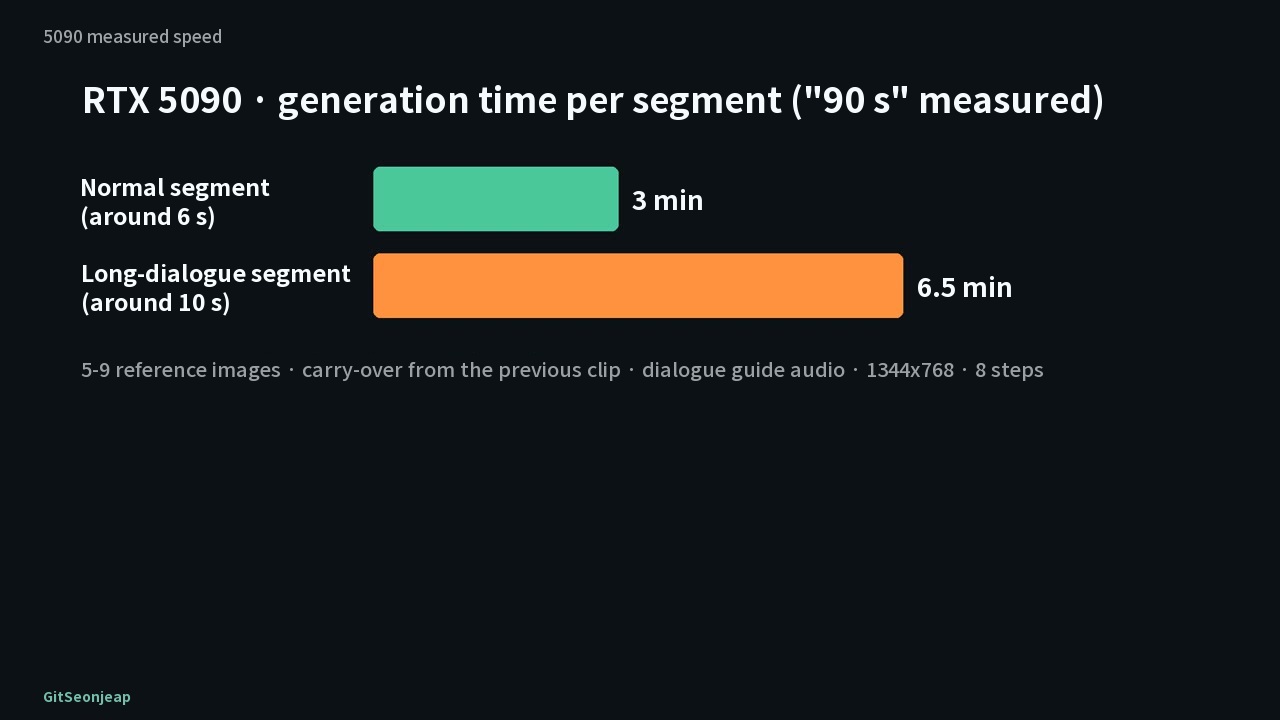
- Actual generation took about 3 minutes for a normal segment (around 6 seconds) and 6.5 minutes for a long dialogue segment (around 10 seconds). The estimate for the whole film was revised from 6 to 9 hours up to 10 to 12 hours.
- Put dialogue at the end of the segment, describe only room sound in sound descriptions, add on-screen text in editing, and make wide shots with several people from a first frame that fixes their positions.
The numbers in this post come in three kinds
| Label | Meaning |
|---|---|
| Our measurement | Values we measured on a single RTX 5090 32GB (rented in the cloud) with ComfyUI 0.37, as of the video's date (2026-09-25) |
| Others' claims / reports | Explanations from the model's side, other channels' measurements and community opinions (sources are in the video description) |
| Estimate | Things we did not measure. The advice for lower-end GPUs falls here |
What we made and how we ran it
"90 Seconds" is a psychological thriller. Character and location images were made with FLUX.2 [dev] and the video with MiniMax H3. The dialogue audio was generated first and fed to H3 as guide audio, so the mouths move to the words from generation, with no separate lip-sync step. Video generation ran on a cloud RTX 5090.
Setting 1, the model file, and setting 2, the Turbo LoRA
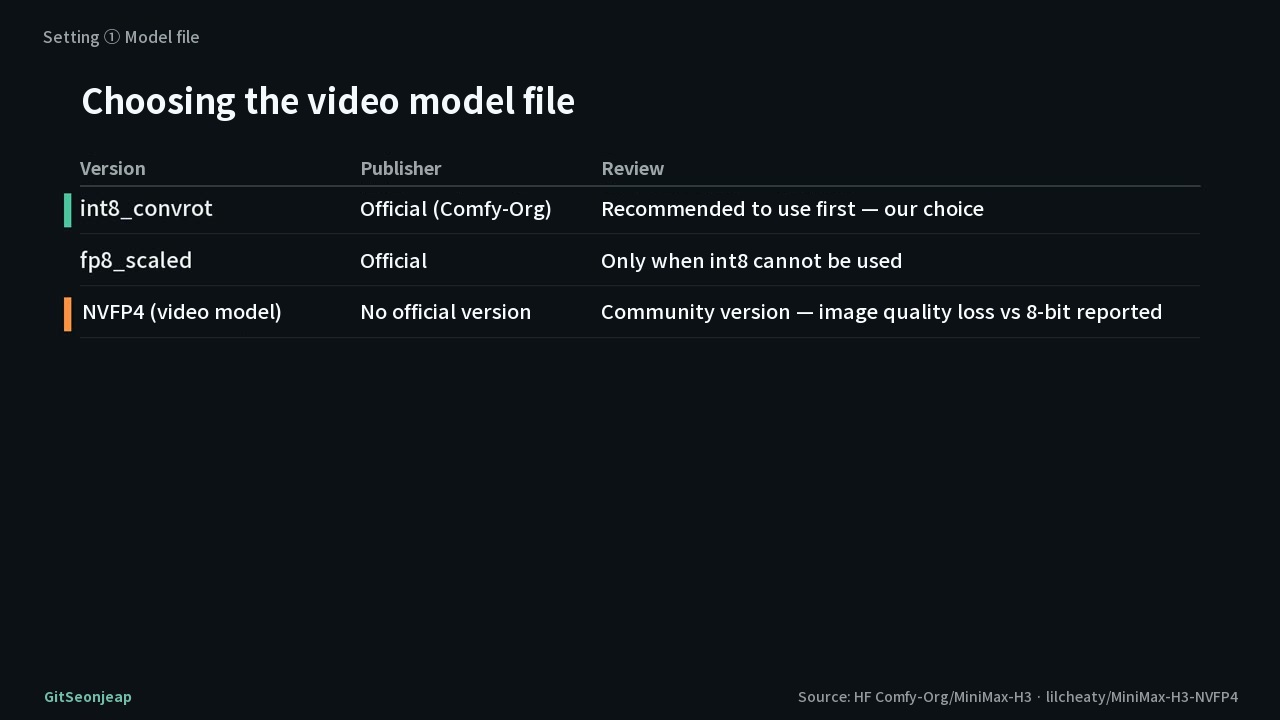
The official repository (Comfy-Org) recommends starting with the int8_convrot version. fp8_scaled is an official version to use only when int8 cannot be used. On a 50-series card NVFP4 comes to mind, but there is no official NVFP4 version of the video model, and there are reports that the community version loses visibly more quality than 8-bit, so we went with int8.
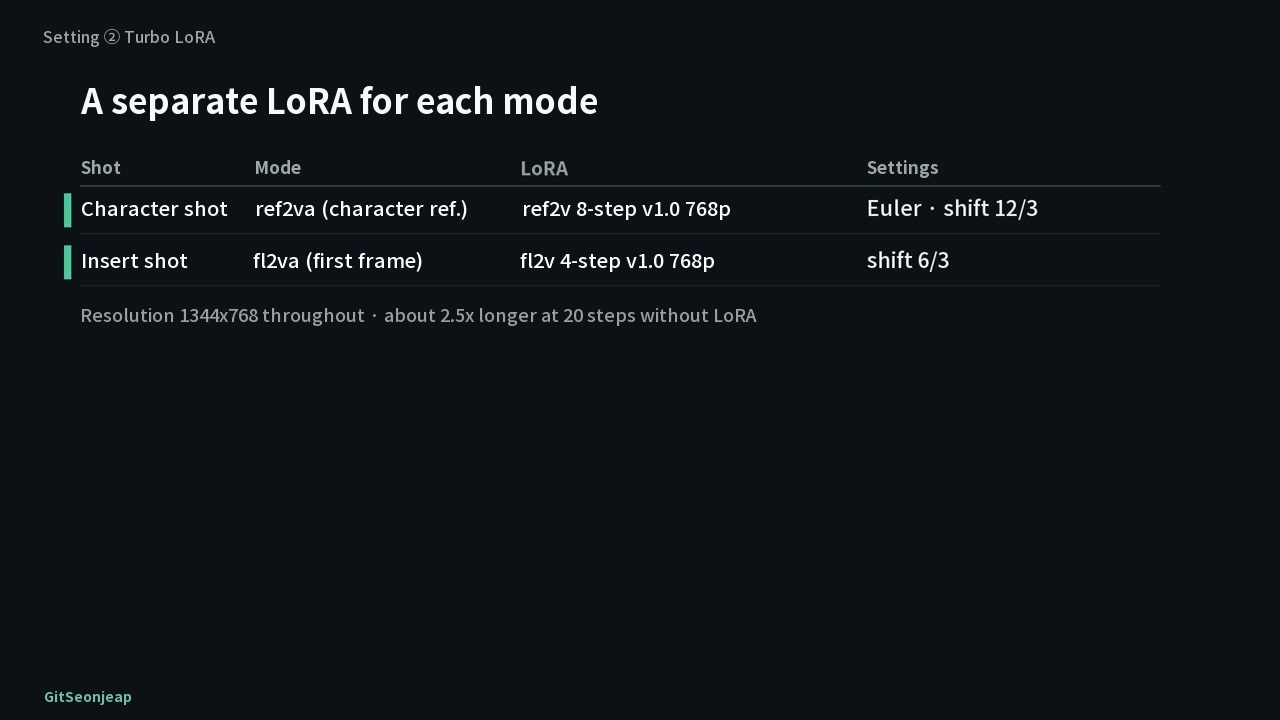
The biggest speed boost is lightx2v's Turbo LoRA, and each mode has its own LoRA. The video notes that at 1344x768 across all segments, 20 steps without a LoRA takes about 2.5 times as long.
| Shot | Mode | LoRA | Settings |
|---|---|---|---|
| Character shot | ref2v (character reference) | ref2v 8-step v1.0 768p | Euler, shift 12/3 |
| Insert shot | fl2v (first frame) | fl2v 4-step v1.0 768p | shift 6/3 |
Opinions on fl2v versions differ. One video says v1.2 is better, while a user says v1.0 is best and v1.2 changes the source a lot (others' opinions), so we chose v1.0, which changes the first frame less.
Setting 3, what we turned on and off (measured by us)
We toggled the two speed options the community recommends on the 5090 and generated four combinations with the same segment and the same seed (one run per combination).
| Combination | Generation time per segment | SSIM vs. baseline |
|---|---|---|
| Both on | 151 s | baseline |
| SageAttention off | 204 s | 0.947 |
| fp16 accumulation off | 138 s | 0.929 |
| Both off | 202 s | 0.932 |
SageAttention clearly helped (about 1.35 times). With fp16 accumulation, the run with it off was actually slightly faster, but with one run each we treat that as within error. Where Comfy's blog saw a speedup from that option was the video VAE, not video generation. The picture was the same in all four combinations: same composition, same content.
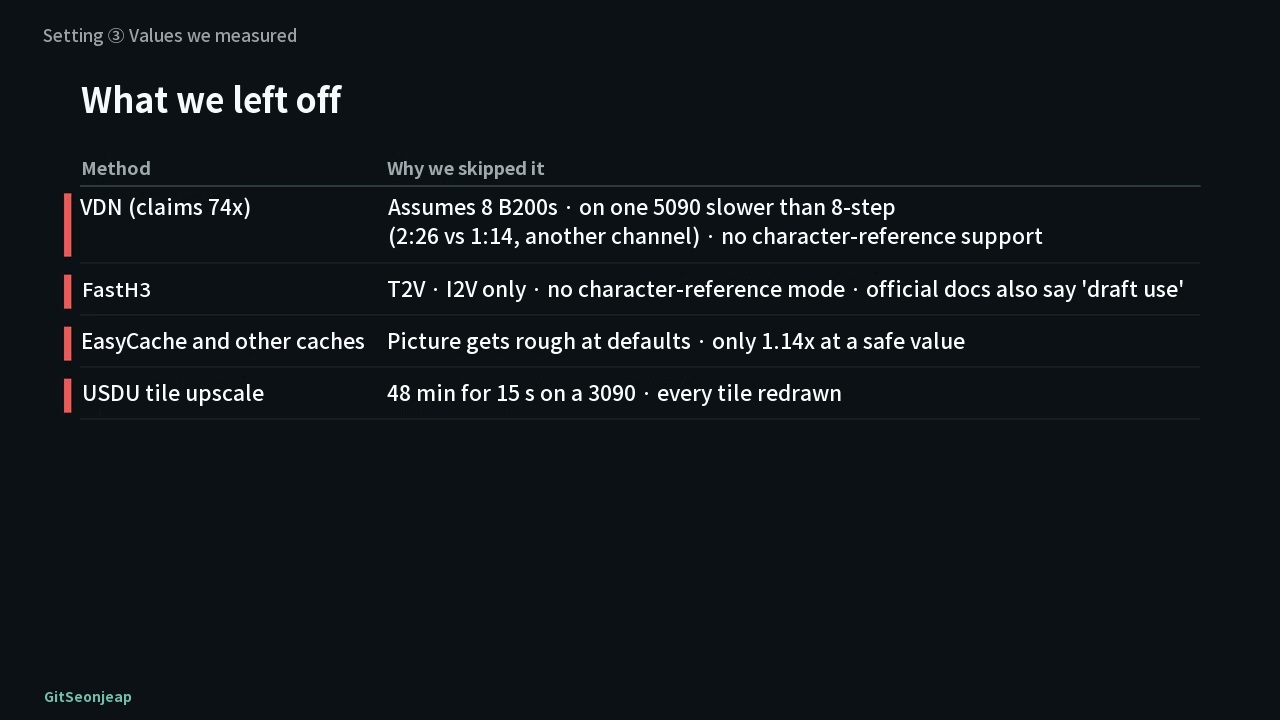
There were also things we did not turn on. VDN, said to be 74 times faster, is a claim under an eight-B200 condition, another channel measured it slower than 8-step on a single 5090, and it does not support character reference either. FastH3 supports only T2V and I2V, has no character-reference mode, and its official documentation calls it "for drafts". Cache acceleration such as EasyCache made the picture rough at default values and gave only 1.14 times at safe values, so we left it off, and USDU tile upscaling took "48 minutes for 15 seconds" on a 3090 according to the video, redrawing every tile, so we did not use it.
Measured speed on the 5090
Generating one segment took about 3 minutes for a normal segment (around 6 seconds) and about 6.5 minutes for a long dialogue segment (around 10 seconds). The video narration says 2 to 4 minutes and 5 to 8 minutes. It is slower than community numbers because of 5 to 9 reference images, carrying over from the previous clip, and the dialogue guide audio. The first estimate for all 198 clips was 6 to 9 hours, and after measuring the first clip we revised it to 10 to 12 hours.
Problem 1: the same line said twice
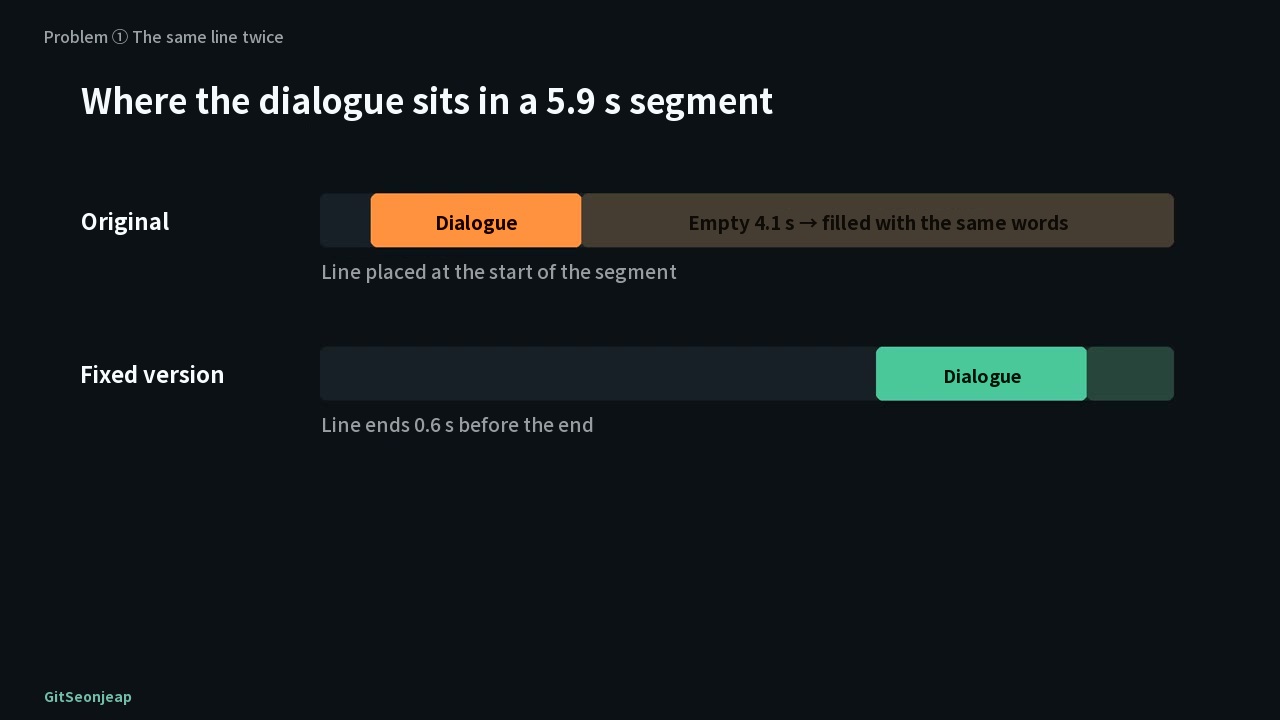
The line was 1.5 seconds but the segment was 5.9 seconds, and H3 filled the remaining 4.1 seconds by saying the same line again. Adding "close the mouth after the line" to the prompt did nothing, and switching to sound-only guidance removed the repeated sound but the mouth kept moving. The fix was to move the dialogue audio so that it ends 0.6 seconds before the end of the segment, not at its start. Both seeds then said it once, and after that all 90 dialogue segments were checked by transcription (Whisper large-v3) and sound comparison, with 0 repeats.
Problems 2 to 4: sound and blank screens
-
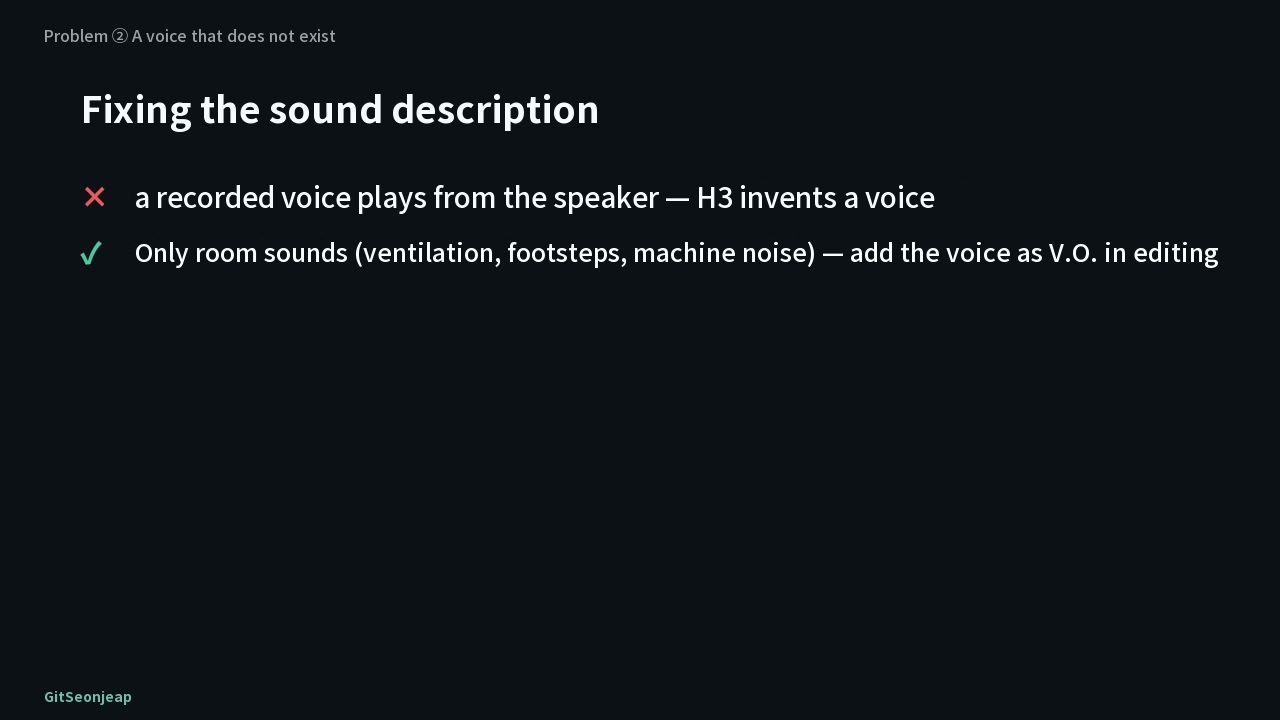
In shots with no dialogue, Russian-sounding speech and meaningless Korean came out. We had written only "a recorded voice from a speaker" in the sound description, and H3 invented that voice. The answer is to add voices in editing and describe only room sound to H3, such as ventilation, footsteps and machine noise.
-
A direction like "silently mouth the words" becomes a talking mouth for H3. Changing it to a closed-mouth action fixed it.
-
H3 fills a blank white screen with something within a second (a person who was not there appeared on a blank white pillar screen). Do not generate on-screen text or video, freeze the first frame and add them in editing.
Problem 5: the positions in a seven-person wide shot keep changing
In a wide shot where seven people are each in a glass room, who was in which room changed from cut to cut, and even with positions written out the order of seven small faces was not kept. When we had the image model draw a first frame with everyone seated in place, it read "the top room" as the top of the pillar, so people stood outside the rooms and their clothes got mixed. In the end we cut out the people and pasted them into each room by coordinates, and used that image as the first frame. All seven cuts then held the same positions to the end. Position wording also needs care. "The far left room" was read as the left edge of the screen, while a landmark such as "the small room just left of the pillar" worked.
Upscaling and operations
The chapters in the video description number problems 1 to 5, and the video then covers upscaling and Mac mini and cloud operations (the video title says "7 problems", but numbers 6 and 7 are not labeled separately in the video).
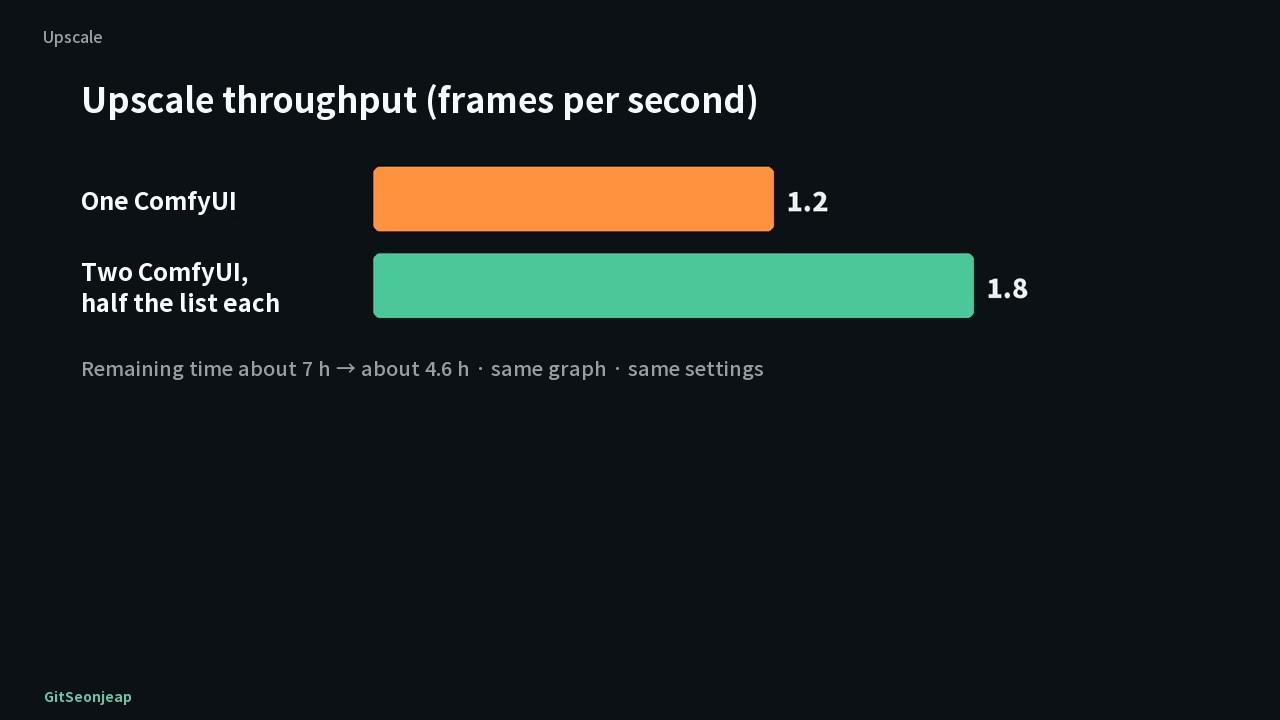
Upscaling was FlashVSR (v1.1 tiny-long) at 2x. Shrinking the input to 960 gives 2.7 frames per second against 1.2 for a 768 input, more than twice as fast, but faces change slightly and lines that were not on the glass become darker, so we fed in the original 768. Watching 5090 utilization at 4-second intervals, it swung between 100% and 0% and was idle about half the time, because the GPU rests while video is being encoded. Starting a second ComfyUI on the server and splitting the list in half raised throughput from 1.2 to 1.8 frames per second, about 1.5 times, with the same settings and quality, and cut the remaining time from about 7 hours to about 4.6 hours.
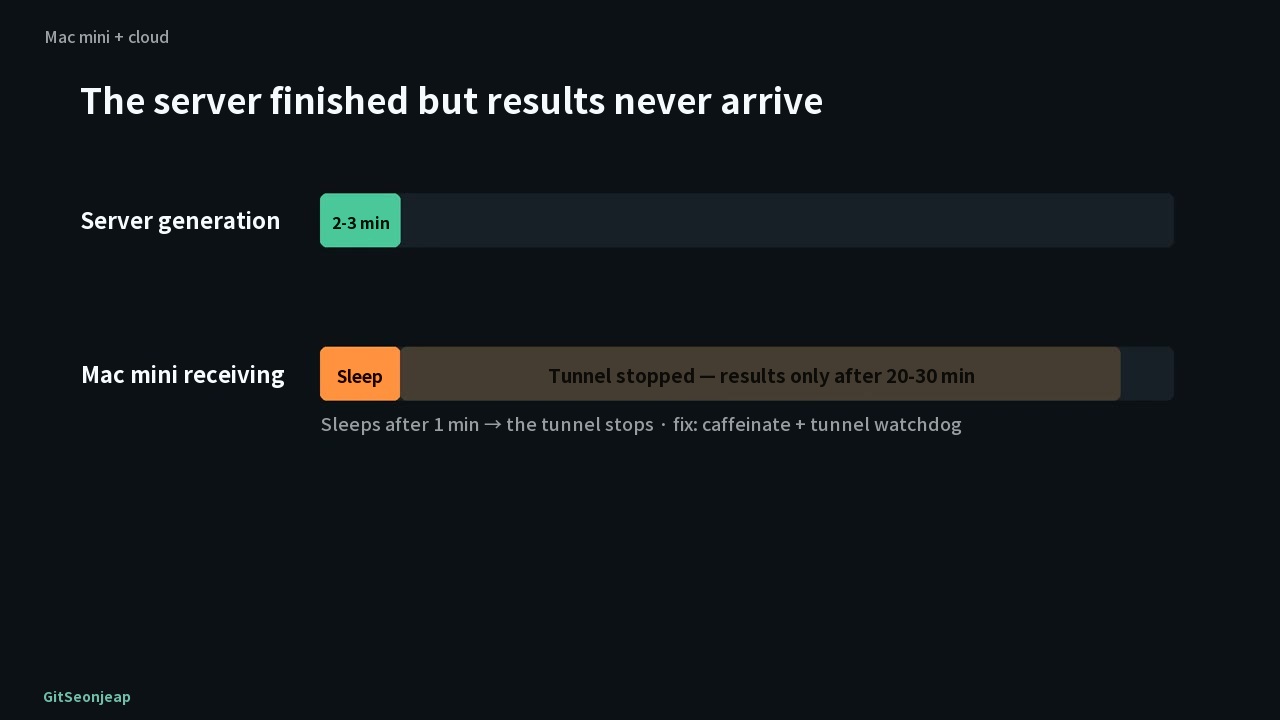
On the server side, a generation that finished in 2 to 3 minutes sometimes reached the Mac mini only 20 to 30 minutes later. The Mac mini slept after one minute and the tunnel to the server dropped, and meanwhile the server sat idle burning money. We blocked sleep during generation (caffeinate) and added a watchdog that keeps the tunnel alive. The checking tool was moved to Mac-native MLX, and transcribing one dialogue segment (Whisper large-v3, Mac mini M6) went from 6.2 seconds with CPU faster-whisper to 0.9 seconds with MLX. A faster turbo version (1.2 seconds) was not used because it wrote "PD" as "피디".
If your GPU is below a 5090 (estimate)
What follows is an estimate we did not measure. The video's advice is that with 24GB you reduce the number of reference images under the same LoRA and split long segments, and with 16GB or less you generate at 960x544, then upscale and keep multi-person wide shots short. On any card, the rules on dialogue placement, sound descriptions, on-screen text and first frames for wide shots work the same.
Limits and reference dates
- The speed-option comparison is one run per combination, so there is error, and the fp16 accumulation difference is treated as within error.
- Speeds and settings were measured on a single RTX 5090 32GB, ComfyUI 0.37, and the "90 Seconds" conditions of 5 to 9 reference images, so other work may differ.
- The values for VDN, FastH3, cache acceleration and USDU are carried over from what the video shows. The single-5090 VDN comparison is another channel's measurement and FastH3 cites the official documentation, but the sources of the cache-acceleration and USDU values are not shown in the video, so we cannot tell whether they were measured directly or cited from reports.
- The advice for lower-end GPUs is an estimate. The finished "90 Seconds" is not included in this video.
- Reference date: video published 2026-09-25. Model and LoRA versions and recommended settings may have changed since. In fact, after this video the channel's default production settings changed to 20 steps without a Turbo LoRA, and upscaling now defaults to shrinking the 1344x768 original to 960x544 before the 2x pass. The settings and judgments in this post are as of the video's publication date.